Know what runs
your application.
EmDash edits your content. Cloudflare runs the application and stores its data. App Composer helps your agent prepare, configure and connect those parts—and explain the choices before you commit.
Reviewed 14 October 2026. The supported stack uses EmDash 1.2.0 and Astro 7.3.5. Provider capabilities below are sourced from official documentation; a provider offering an API does not mean its Composer connection has shipped.
What do I see, and what do I do?
- Explore in your browser. Open a working app, follow Learn, or use Init to describe content, fields and appearance. Public browsing needs no Composer account.
- Give the request to your coding agent. Open an authorised folder in Codex. Get Ready supplies the handoff and checks tools, source and the selected Cloudflare environment. You complete account sign-in and consequential approvals when needed.
- Review the application’s structure. Init exports a portable specification. The agent implements it against supported source and your chosen services, then builds, deploys and verifies the result. Downloading a spec alone creates no cloud resources.
- Run it through its admin. Use EmDash for content and the connected app controls for everyday work. Ask the agent for structural changes, maintenance or a new integration. Your source and app data retain their own ownership.
The existing operator and supported private Hello paths are verified. A universal one-click customer setup, arbitrary customer deployments and a completely tailored admin for every app remain work to deliver. Read the release evidence.
Where the ideas meet
ACF and MetaBox inspire named fields, repeatable content and understandable editing forms. Koji inspires small configurable apps that can work alone or together. EmDash supplies the CMS and extensible admin. Get Ready establishes the environment; Init gives the agent a structured brief; composition joins reviewed app APIs. These are design influences, not compatibility claims with those products.
Different tools own different jobs.
| Tool | What it does | When it makes sense |
|---|---|---|
| App Composer | Agent-led preparation, specifications and connections between independent applications. | You want a custom application with clear source, configuration and service ownership. |
| EmDash | Content types, editing, media, publication and an extensible admin on Astro/TypeScript. | You need a content editor inside an application. A simple site can use EmDash without multiple mini-apps. |
| WordPress | A CMS with themes, plugins and established publishing workflows. | Your current theme or plugins already solve the problem. Keep them when a replacement offers too little benefit. |
| Cloudflare | Application runtime, routing, databases, file storage and related infrastructure. | It is Composer’s currently supported deployment target. It does not supply a complete shop or business inbox merely by hosting a site. |
| AWS | A cloud platform with compute, storage, databases and other managed services. | Your application already depends on AWS or needs its particular services. Composer has no verified AWS deployment adapter today. |
| Shopify | A commerce platform that can provide the backend for a custom storefront. | You want managed commerce operations, with either a Shopify theme or a separately built storefront. |
WordPress plugins do not become EmDash plugins by changing their names. Inventory the pages, fields, forms and integrations people use; assess imports and feature replacements separately. EmDash has a Node.js deployment option, but that alone does not prove an AWS Composer workflow. For rough orientation, Workers handles application execution, R2 handles object storage, and D1 handles lightweight relational data; AWS offers services such as Lambda, S3 and RDS for those broad jobs, with different operating models.
Sources: WordPress · EmDash migration · EmDash on Node.js · AWS database choices
If my app needs a database, whose is it?
Default to app-owned resources in the selected owner’s account, separated by environment. Sharing a Cloudflare account is not sharing a database. A binding is the configured connection from a Worker to a resource; two apps can both call their binding DB while connecting to different databases.
| Part | Owns | Connects through |
|---|---|---|
| Composer / EmDash | CMS content, users/settings, Composer records and its media bucket. | Its D1 database, R2 bucket and session KV namespace. |
| Here / there | Photo records, moderation, app settings and private original images. | Its own D1 database and R2 bucket. |
| Top shelf | Curated cards, order and app settings. | Its own D1 database; Guestbook’s approved-item API. |
Top shelf references a photo; it does not copy Guestbook’s database or private bucket. Standalone and composed versions intentionally share that app’s records, so hiding a photo applies to both. Preview uses separate CMS D1/R2/KV and has no production mini-app service bindings.
Choose from the workload
- Structured records and queries → D1
- Posts, submissions and other relational data. Check indexes, write load and size before choosing it for a large application.
- Images, screenshots and files → R2
- Store file bytes separately from records and enforce who can read them.
- Cached settings and data tolerant of delayed updates → KV
- Do not use eventual consistency for a decision requiring immediate agreement.
- Live coordination → Durable Objects
- Consider them for multiplayer rooms or collaborative state. They are not needed for an ordinary catalogue.
- Existing SQL infrastructure → a database connection
- Assess PostgreSQL/MySQL and Hyperdrive when the application already needs them.
A CMS plugin can keep its scoped settings/data in EmDash. A separately maintained mini-app should own its data and migrations. Share a database only for a documented application boundary; connect independent apps through scoped APIs. Apps without persistent records need no database.
For every decision, record the account/environment, workload, permissions, cost estimate, export/recovery plan and why simpler options do not fit. Verify the chosen queries, access failures and restoration process. The number of databases is not a bill estimate.
Sources: Cloudflare storage choices · D1 limits · EmDash database boundaries
Everyday editing belongs in admin.
Invited Composer administrators can open Manage mini-apps in EmDash to upload and approve Guestbook photos, feature approved photos in Top shelf, save draft links, publish or hide cards, reorder them and change each app’s appearance. The server calls the pinned app’s API with its private owner credential. The browser receives no owner token.
The CMS catalogue editor and media library remain native EmDash. Connected app controls use app-owned data. Hello and Link Check have their own workflows; Portable AI State is a separate fictional-only demo. Public visitors gain no administration rights, and customer/game accounts are a different capability.
EmDash supports media fields and custom admin extensions. A field becomes useful only when the public application reads and renders it. A complete client-specific publishing experience—including broader content templates and catalogue screenshot galleries—needs its own working implementation and acceptance.
The connected admin, in production
These are captures of the working EmDash extension on 14 October 2026. The photo examples are approved generated artwork. We verified upload, approval, featuring, source revocation, draft-link publication, reordering and settings through the live controls.
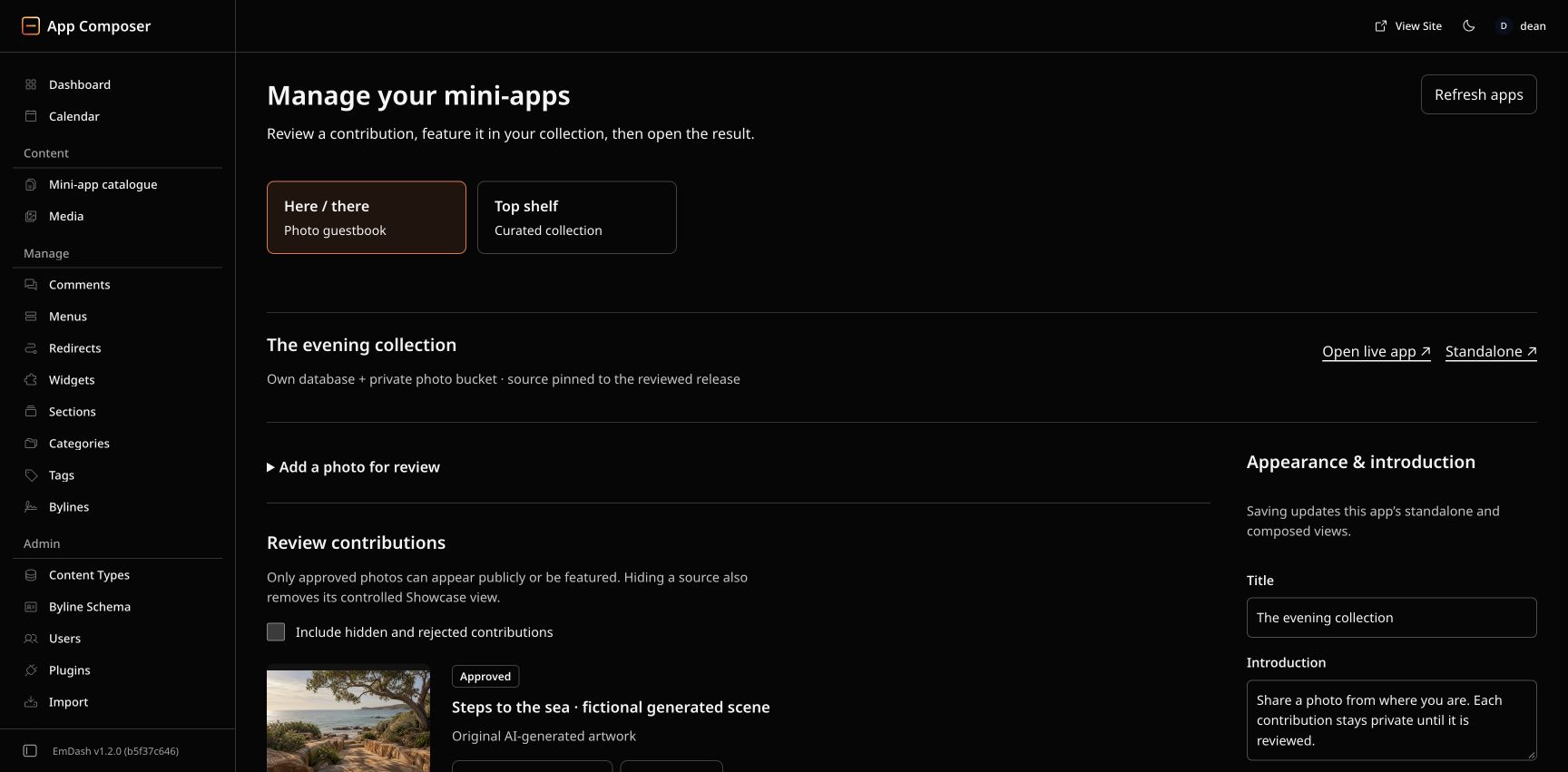
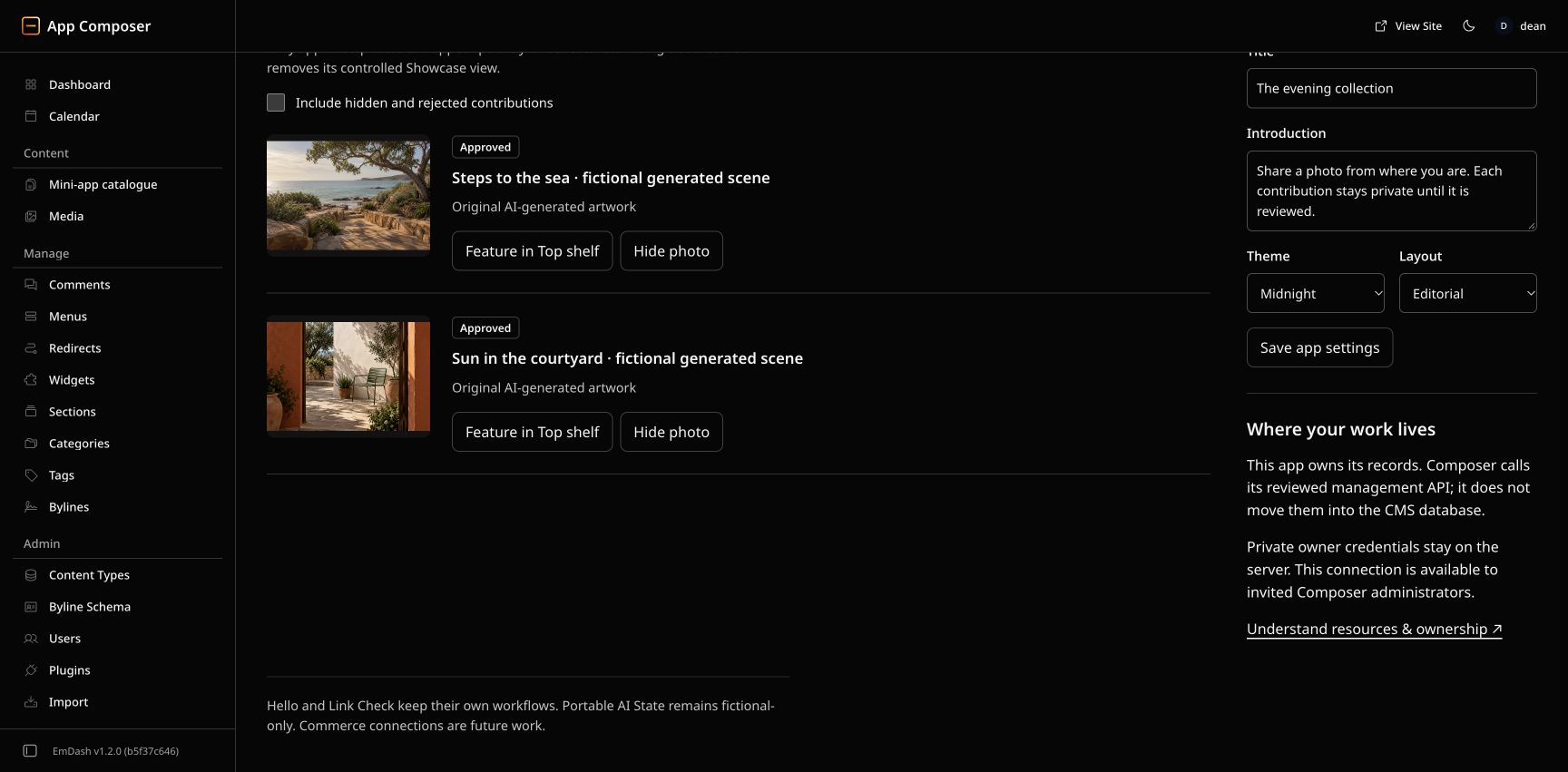
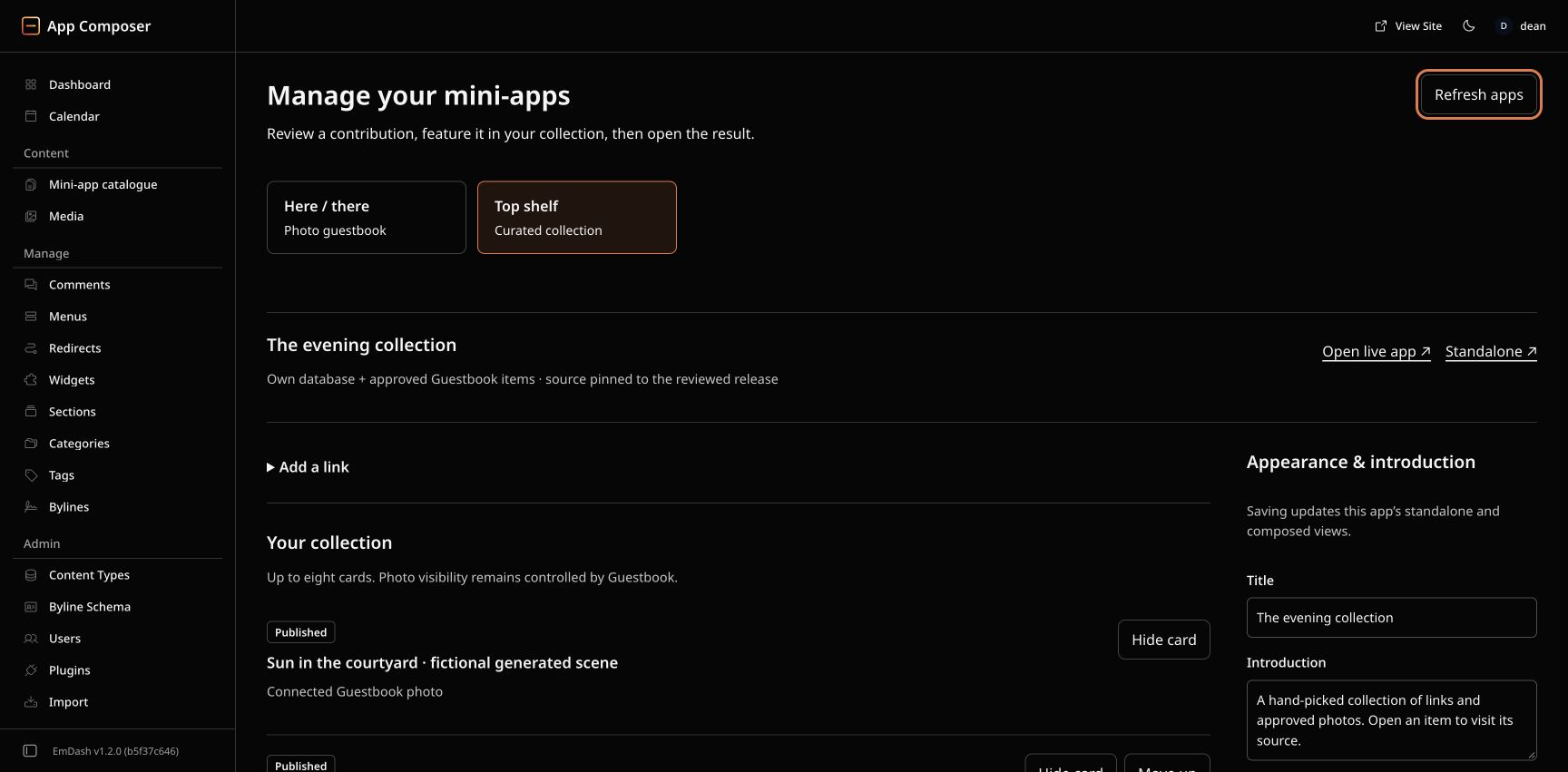
Capture source, exact pins and verification boundaries. Full customer onboarding and administration for every app remain separate acceptance work.
Sources: EmDash admin · Media library · Admin extension APIs
Where Shopify, Stripe and Printful fit.
These are intended future connections, not shipped Composer integrations. You should eventually be able to choose them in Init, have Get Ready verify the selected account and permissions, and manage the relevant connection from your app’s admin. No provider accounts, checkout or fulfilment are created by this guide. Follow the Shopify, Stripe and Printful integration requirements.
| Service | Owns the job | What Composer would connect |
|---|---|---|
| Shopify | Commerce backend and checkout for a Shopify store. | Content/storefront to product and cart APIs, then a handoff to Shopify checkout. Shopify remains the commerce source of truth. |
| Stripe | Payment collection and supported billing workflows. | A custom app to hosted checkout, verified payment events and its own order or access model. |
| Printful | Print-on-demand production and fulfilment. | A chosen order system to products/artwork, shipping details and fulfilment status. |
| WooCommerce | Commerce running with WordPress. | Retain an existing store and connect its APIs, or migrate deliberately to a chosen commerce backend. |
Shopify and Stripe should both be available for appropriate applications. Each order has one checkout owner. A Shopify checkout uses its supported payment configuration; a separate custom checkout can use Stripe. Adding an independent Stripe charge to a Shopify order is not an integration strategy. Provider availability, merchant region and account permissions must be checked.
Replacing WooCommerce is replacing a workflow.
Inventory products and variants, customers, historical orders, subscriptions, discounts, tax, shipping, inventory, refunds, emails and every relied-on extension. You can keep WooCommerce behind a new frontend, move the shop to Shopify, or build a narrower custom order system around Stripe. A payment button alone does not replace WooCommerce.
First prove an isolated migration, reconcile records and URLs, then test purchase, payment failure, refund and fulfilment. Subscription/payment-token transfer depends on the providers; do not promise it from a content import. A standard Shopify theme or a retained WooCommerce store can be the more proportionate choice than a custom storefront.
Payments and fulfilment need verified events.
A checkout return page is not proof of payment. A future connector must verify the provider event, process duplicates safely and reconcile pending payments before granting goods or access. Printful confirmation submits an order for fulfilment and can charge the owner; keep that behind explicit authority and verified payment/order state. Track failed production, shipping updates and refunds separately.
Sources: Shopify storefront choices · Stripe Checkout · Stripe events · Printful orders and fulfilment · WooCommerce API · Subscription migration limits
Email is more than one checkbox.
- App notifications
- Invitations, password recovery and order updates use a configured sending provider. Composer has an existing Resend transport with an invited-recipient allowlist and verified delivery evidence; it is not general customer email provisioning.
- Newsletters and promotions
- Choose a marketing workflow with recorded consent, unsubscribe and suppression handling. Do not silently turn a form submission into a newsletter subscription.
- Your business inbox
- Choose a mailbox service for reading and replying as your business. An outbound email API does not supply that inbox.
- Cloudflare email
- Current official documentation describes inbound routing and outbound transactional sending in beta. Composer’s deployed transport is Resend; no Cloudflare sending adapter has been verified here.
Each app needs an explicit sender, domain authentication, recipient rules, delivery/failure handling and a recovery path. Provider acceptance is different from confirmed delivery. Domain ownership and email routing must be preserved during website moves.
Sources: Resend domain verification · Resend sending · Cloudflare Email Service
What else needs a decision?
- Forms and customer accounts
- Decide who can submit, what is stored, moderation, spam controls and account recovery. The current photo demo accepts invited-owner uploads. CMS administration does not supply universal customer login.
- Domains, search and sharing
- Keep domain ownership, HTTPS, redirects, email DNS, metadata and public media eligibility explicit. Moving a website should preserve meaningful old URLs. A sitemap is not proof of search indexing.
- Reliability and recovery
- Define acceptable data loss and downtime. Back up source/configuration, databases and media; preserve account/key access; prove an isolated restore. Rolling back code does not restore records or deleted photos.
- Usage and running costs
- Budget for cloud requests/CPU, storage, domains, agent/provider use, commerce fees and fulfilment. Workers Paid starts at US$5/month; that is not a complete project quote. Alerts and CPU limits are not hard spending caps. Check current Workers pricing.
- Maintenance and support
- Assign ownership for updates, connection failures, provider changes, monitoring and customer support. Composer pins reviewed source and preserves owner configuration; broader customer update/recovery coverage remains unfinished.
The practical goal is an application whose content is editable, whose services have clear owners, and whose important user journeys work. Choose the smallest set of parts that meets those needs.