Your first app
You have an idea, or just the urge to make something. Start with an agent and a folder. Get Ready establishes the supported environment before Init asks what to build.
Start without a project brief App ComposerLoftwah’s instance
App Composer gives you and your agent a way to work across the tools behind a project. It connects what you asked for with the source, creative work and live release. Each tool keeps control of its own data and permissions.
The goal is a project workspace where you can reopen the brief, find your artwork, see what’s running and decide what to change. You can see parts of that workflow in these examples today.
Composer keeps relational records in D1, media in R2 and sessions in KV. A job that needs per-entity coordination can use a SQLite-backed Durable Object. Retried delivery needs a stable event ID and an idempotent consumer.
You have an idea, or just the urge to make something. Start with an agent and a folder. Get Ready establishes the supported environment before Init asks what to build.
Start without a project briefYou know content, custom fields and white-label sites. Assess the WordPress workflow, bring the useful structure to EmDash and let agents implement the compatible application.
Review migration fitMaintain one app in its own repository. Give it a clear configuration contract and data/actions another app can use. Composer pins source and preserves owner settings.
Read the app contract and release modelReuse the independent Get Ready engine to coordinate supported cross-service setup and verification. The local library/API/MCP share evidence; broader integrations still need acceptance.
Inspect the reusable capabilityGet Ready can prepare an environment before an application idea exists. Init turns requirements into a portable specification. Independently maintained apps provide the pieces; your authorised agent connects, tests and publishes them.


The outcome is a working environment and a verified HTTPS app. A tutorial or a green checklist alone cannot establish that.


The independent MIT core detects missing tools, prepares supported dependencies and private source, verifies GitHub and Cloudflare access, deploys the reviewed reference and rechecks exact HTTPS source. Private evidence lets the agent resume after a failure or a human sign-in step.
The local programmatic API, CLI and optional stdio MCP use the same engine. Composer’s progress view reads its redacted report. The current core uses Wrangler and scoped Cloudflare API checks. An external authorised agent may use Cloudflare MCP separately for provider operations; Get Ready coordinates the cross-service readiness workflow.
Use the library · Connect local MCPYou open a folder in the supported agent, choose a first address and hand over the setup request. The agent does routine technical work. You complete official authentication, purchases or permissions only when they are actually needed.
Verified today: Codex on Apple Silicon Mac, pinned workspace tools, GitHub, an existing Cloudflare account and maintained/private Hello paths. First-account creation, more agents and operating systems, new-domain setup and a hosted API remain unfinished.
Open Get ReadyKeep the lessons that made WordPress approachable. Build on EmDash’s Astro and TypeScript foundation, with agents handling the work around it.
EmDash is an open-source CMS with WordPress migration tools and a sandboxed plugin model. Composer already uses its native administration and managed catalogue. The product direction extends that foundation into custom applications, structured forms and reusable features.
WordPress knowledge remains useful: clear field names, sensible defaults, repeating content, conditional groups, editor roles and a client’s own brand. Init brings that structure into a portable app specification and the agent’s build workflow.
Cloudflare’s EmDash introductionInventory the content, custom fields, forms, integrations and plugins that people actually use. EmDash documents WXR and exporter-based migration. Plugin behaviour must be assessed separately; recreate useful compatible capabilities, not WordPress internals or proprietary assets.
Migration automation and a broader plugin/field ecosystem are product work to deliver, not services proven by this demo.
Official migration guide · Plugin porting guidanceWorkers Paid has a US$5 monthly minimum. Actual usage and other products can add charges. Storage, domains and agent/provider costs depend on the application; that starting price is not a whole-project quote or spending cap.
See the measured Creator Hub costs, the Baselime precedent and the limits
Current Workers pricing and included usageDescribe the useful outcome, essential plugins and content types. We can assess what fits EmDash and what needs a custom building block. Keep private client information and credentials out of public issues.
Discuss a migration or building blockThink of the useful part of MetaBox and ACF: content types, named fields, groups, defaults and conditions. An agent does the implementation around that structure.
“A community photo wall. Review submissions before publication. Give approved photos a curated place.” The brief describes behaviour, not a framework shopping list.
Choose the apps, edit real fields, give each app its own settings and see the result. Irrelevant controls disappear. Supported choices and limits come from the pinned app contracts.
Download the versioned JSON and copy the matching agent request. The agent preserves the independent repositories, checks the environment, implements and verifies the deployed result.
Hello has a title, introduction and theme. The photo pair adds gallery layouts, curated HTTPS links and separate app settings. Older shared drafts migrate; incompatible source pins are refused. Settings-only updates have been verified on the existing operator pair.
Try the configurable formThe content-model editor lets you describe a form to your agent, import its validated structure, edit typed fields, groups and optional conditions, and test bounded repeating rows. Export the portable model and compatible EmDash seed for review in your authorised project. A preview cannot publish fields or grant CMS permissions.
The supported editor maps to current EmDash fields; nested repeaters, required conditional fields and automatic customer deployment are not supported. Open the content-model editor.
Borrowing Koji’s approachable configure-and-remix spirit, each mini-app should be useful by itself and become more useful when connected.



A small place to leave a moment from somewhere. The owner reviews photos before publishing them. A gathering, travel collection or community wall can have its own voice.
Open the photo guestbook
A collection with an editor behind it. Arrange links and approved guestbook contributions, give them context and open their originals. It keeps its own source and card collection.
Open the curated showcaseFeature an approved contribution, open its original, then hide it at the source. Current visibility applies to both views. The connection uses item IDs and actions—not an iframe or a copy of private media.
Try the composition workflow · Explore Link Check, Hello World and the fictional Carry / forward
An optional Chrome extension should put the same App Composer experience where you already manage the deployment.


A compact drawer, neutral surfaces, readable controls and restrained orange fit the dashboard’s working context. App Composer remains visibly third-party. An explicit extension click opens it; it does not scrape dashboard credentials or pretend browser login grants API access.
Get Ready, Init and decisions share the portable specification and authorised agent workflow. The dashboard stays the place for actual Cloudflare account and permission controls.
The MV3 source includes an explicit-click workspace, local resume, real Init fields and a copy-to-agent handoff. It requests activeTab rather than persistent all-sites access.
Chrome installation and signed-in dashboard acceptance are not yet verified. This is not a Web Store release, official integration or completed autonomous dashboard flow.
Inspect the extension source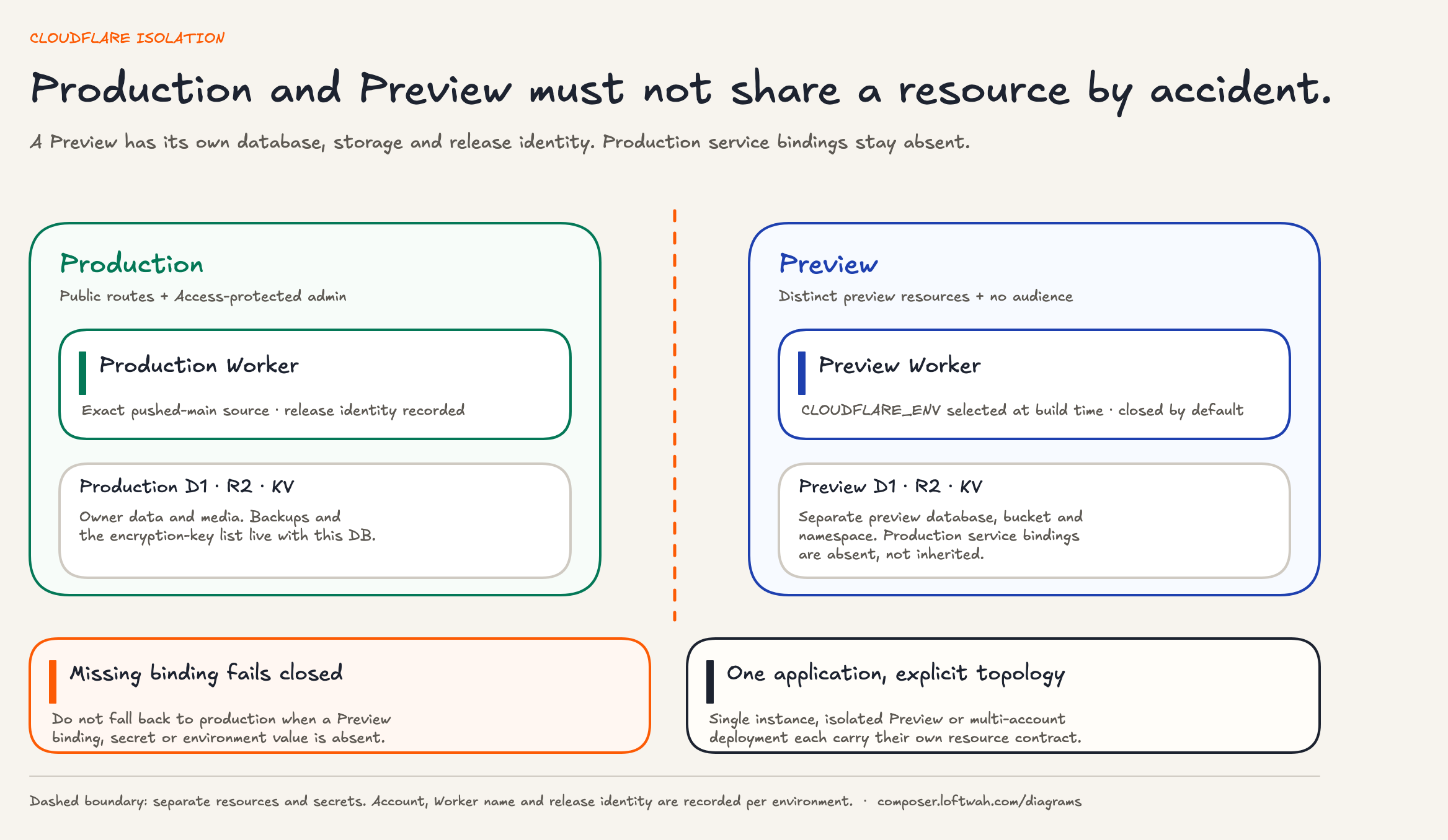
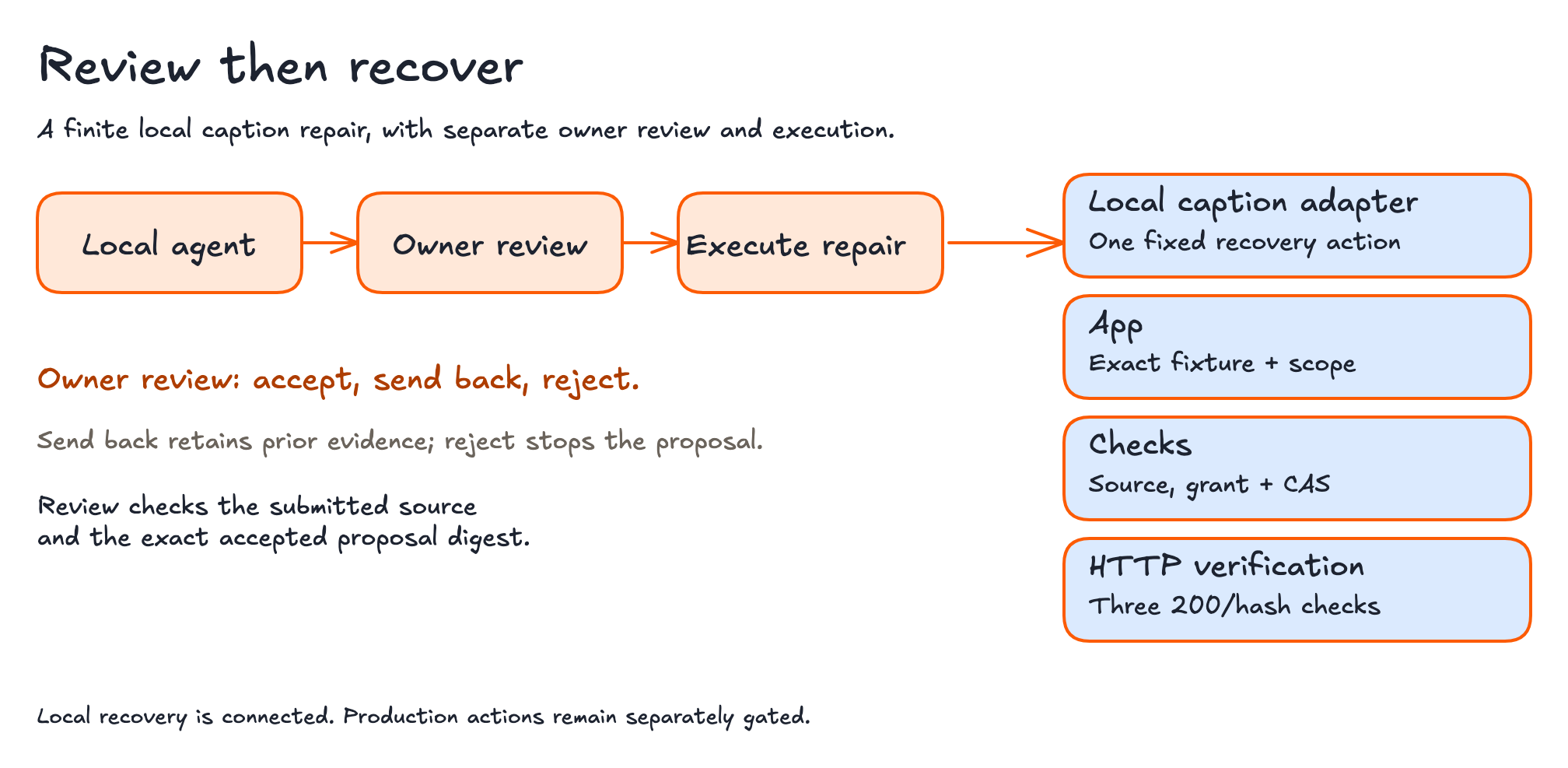
Each app keeps its GitHub history, configuration and data. Composer pins reviewed commits into a release. A candidate is checked before activation, and owner settings remain separate from upstream code.
Code rollback is not data rollback. An old executable cannot restore a deleted photo or override a current privacy decision. Complete data/media recovery and wider customer-update acceptance remain open.
Woodhouse operates the work; deployed customer applications do not depend on it. Public browsing does not create a Composer account or grant build access. Credentials remain in the authorised execution environment.
Carry / forward is a separate encrypted assistant-memory mini-app using fictional data only. Shared game identity is a different planned mini-app; it does not enable public signup here.
Technical model · Verified release outcomes