Mara Quinn asked for a place for her ceramics, somewhere people could leave a note, and a way to decide what appears. Her agent built it from an App Composer specification. Both apps are live, and each keeps its own source, database and release.
Mara Quinn is fictional. The apps run in the operator’s Cloudflare account on the operator’s domain; this is a reference build, not a customer deployment.
Build your own two-app Creator Hub from the reference, or add a reviewed guestbook and a curated profile to an app you already run. The live reference belongs to its operator; your build uses your own accounts and domain.
What you build
Two independent apps: Here / there for guest postcards and owner moderation, and Linkarooie for the profile, curated links and separate featured picks.
What it does
Lets a visitor send a note with the public postcard code, keeps it private until the owner approves it, and shows an approved item only when the owner also chooses to feature it.
What you need
GitHub
Cloudflare account with Workers and D1, plus R2 for Here / there
Node 22 and pnpm 12.8.1
A hostname you control
An owner credential for each owner studio
Working result
Two HTTPS hostnames with independent source and data, a reviewed contribution that becomes public only after approval and featuring, and an Init plan that names every agent and human step.
Goal
Build my own Creator Hub with two independent apps: a moderated guestbook that accepts contributions and a Linkarooie profile that curates approved work and links. Use https://composer.loftwah.com/creator-hub as the reference and copy the reviewed source at its exact pin: Here / there at https://github.com/loftwah/creator-hub-guestbook/tree/36797b8028682460c33fe092682bfbd63751ec1a (revision 36797b8) and Linkarooie at https://github.com/loftwah/creator-hub-showcase/tree/acca7da3bfac4ebc28fca67a35ac373b23747409 (revision acca7da).

Prerequisites
- My own GitHub account, Cloudflare account and a hostname I control.
- Cloudflare Workers, one D1 database per app and an R2 bucket for the guestbook.
- Node 22 and pnpm 12.8.1, as pinned by both repositories, with a native Wrangler install available through them. Do not substitute another Node line.
- An owner credential I create for each app's owner studio (OWNER_API_TOKEN), and the guestbook's public postcard code. Cloudflare Access is not required for those independent studios; it applies only if I choose Composer's invited-administrator panel.
- A supported coding agent. Read each repository's README, Wrangler configuration and release notes at the revisions above for the exact binding and secret names.

Greenfield behaviour
Create two new repositories and deployments from the reviewed revisions above. Keep their Workers, D1 databases, media, configuration and releases separate. Do not merge them into one project or one database. Do not follow either repository's current main instead of these revisions. Use fictional profile content and fictional contributions.

Build requirements
1. Configure the pair in Init at https://composer.loftwah.com/init?start=creator-hub, review the exported plan and keep its agent and human labels. Export a specification; it is a brief, not a deployment.
2. Deploy the guestbook first. The profile reads approved contributions through a service binding, so it needs a working source.
3. Keep owner moderation in the guestbook: a contribution is private until the owner approves it. Keep featuring in the profile as a separate choice. The postcard path is an owner setting; its public puzzle code (hunter2 in this source) is not a secret and never grants owner access.
4. Keep featured picks as a saved profile setting so they survive a release without a code fork.
5. Keep each app's owner API and data export. Do not add public signup, customer accounts or a shared owner credential.

Verification
Run each repository's own checks. Then exercise the real journey with fictional data: send a note with the public postcard code (hunter2), confirm it is private, approve it, feature it, open the source link, hide it at source, confirm both public views stop showing it and the item and media return 404. Confirm that the code alone cannot sign in to /owner or change settings. Check signed-out access denial for owner routes and that featured picks survive a redeploy. Check the profile and guestbook at phone and desktop widths.

Release and live acceptance
Deploy to my own hostnames through each app's existing release guard. Verify the exact source revision and release identity each app reports, then repeat the journey on the live hostnames. Record the URLs, source revisions and observed results. The published Creator Hub is a reference build in the operator's account; do not claim an independent rebuild or a customer deployment from it.

Stop for me
Ask me to sign in to GitHub and Cloudflare, approve hostnames, create each owner credential, turn on guest postcards, decide that a contribution may be published, and approve any spending. Use my own accounts, resources and domain. Do not assume access to the example author's projects, media, domain, credentials or provider balance. Never put a secret value in a prompt, log, commit, screenshot or configuration example; name an environment variable only when the repository already documents it.
Use your keyboard shortcut or your device’s copy menu to copy the selection.
Add to my existing appAdd this to my existing apps
Goal
Add the Creator Hub capability from https://composer.loftwah.com/creator-hub to apps I already run: a moderated guestbook intake, in the Here / there role, and a curated Linkarooie-style profile with separate featured picks.

Prerequisites
- Inspect my existing apps, identity, data model, hosting, bindings, moderation states and release path.
- Use my own accounts and an authorised target. Read my apps' documented binding and secret names; do not invent them.

Existing-project behaviour
Preserve my code, data, URLs, authentication, publication settings and owner customisations. Do not overwrite an app, replace its database or merge the two apps. If my current apps lack a moderation state or an owner-review boundary, explain the gap before adding one. Prefer a small service binding contract over copying approved content between databases.

Build requirements
1. Define one exact source reference for an approved item and resolve it on each public render.
2. Keep private submissions, review, approval and revocation in the intake app. Keep curation and featuring in the profile app.
3. Add no public signup or general customer accounts. Keep owner access behind my existing invitation and permission model.
4. Store featured picks as configuration so they can change without a release.
5. Keep an export for each app that does not include credentials.

Verification
Add contract and moderation tests in my existing test setup. Exercise the journey in preview or staging with fictional data: private before approval, public after approval, featured only after a separate choice, gone from both views and 404 at the source after hiding. Check that an unauthorised or signed-out request is denied. Do not use production visitor records.

Release and live acceptance
Follow my release rules, verify the deployed source and both hostnames, then repeat the journey live with fictional data. Report anything still unproven.

Stop for me
Ask me to sign in, approve permissions, change access, authorise a migration, publish a contribution or spend money. Use my own accounts, resources and domain. Do not assume access to the example author's projects, media, domain, credentials or provider balance. Never put a secret value in a prompt, log, commit, screenshot or configuration example; name an environment variable only when the repository already documents it.
Use your keyboard shortcut or your device’s copy menu to copy the selection.
Understand how it worksExplain the reference build
Goal
Explain the Creator Hub reference at https://composer.loftwah.com/creator-hub and the two apps behind it.

Prerequisites
- Read the reference page, Here / there at revision 36797b8 (https://github.com/loftwah/creator-hub-guestbook/tree/36797b8028682460c33fe092682bfbd63751ec1a), Linkarooie at revision acca7da (https://github.com/loftwah/creator-hub-showcase/tree/acca7da3bfac4ebc28fca67a35ac373b23747409), their build identities and the Init plan.
- Use only public source and published evidence.

What to explain
Follow the brief from a person's own words to the Here / there guestbook and the Linkarooie profile, one shared configuration and separate data. Trace an approved contribution and a featured pick through both apps. Explain who owns source, databases, media, moderation and publication, and why a code rollback is not a data restore. Separate the operator's reference build from a customer deployment, and say plainly that the page does not claim an independent owner has rebuilt it.

Verification
Cite the exact file, commit or live response for each claim, and mark anything you cannot verify as unknown. Do not treat a screenshot or a blueprint as deployment proof.

Boundaries
Keep this read-only: do not change files, accounts, data or deployments, and do not use the example owner's private projects or credentials.
Use your keyboard shortcut or your device’s copy menu to copy the selection.
Open a prompt to read it before copying. The copied text is exactly the text in the panel. If the copy button is unavailable, select the text and copy it manually.
The brief, in the person’s own words.
“Give me a home for my work on my domain. Let people send contributions that I review before publishing. Let me edit the content, choose what appears, and ask my agent to add or change something later.”
No framework, hosting or database was chosen in that sentence. The specification turned it into two apps, one shared configuration and a set of decisions about who may see what.
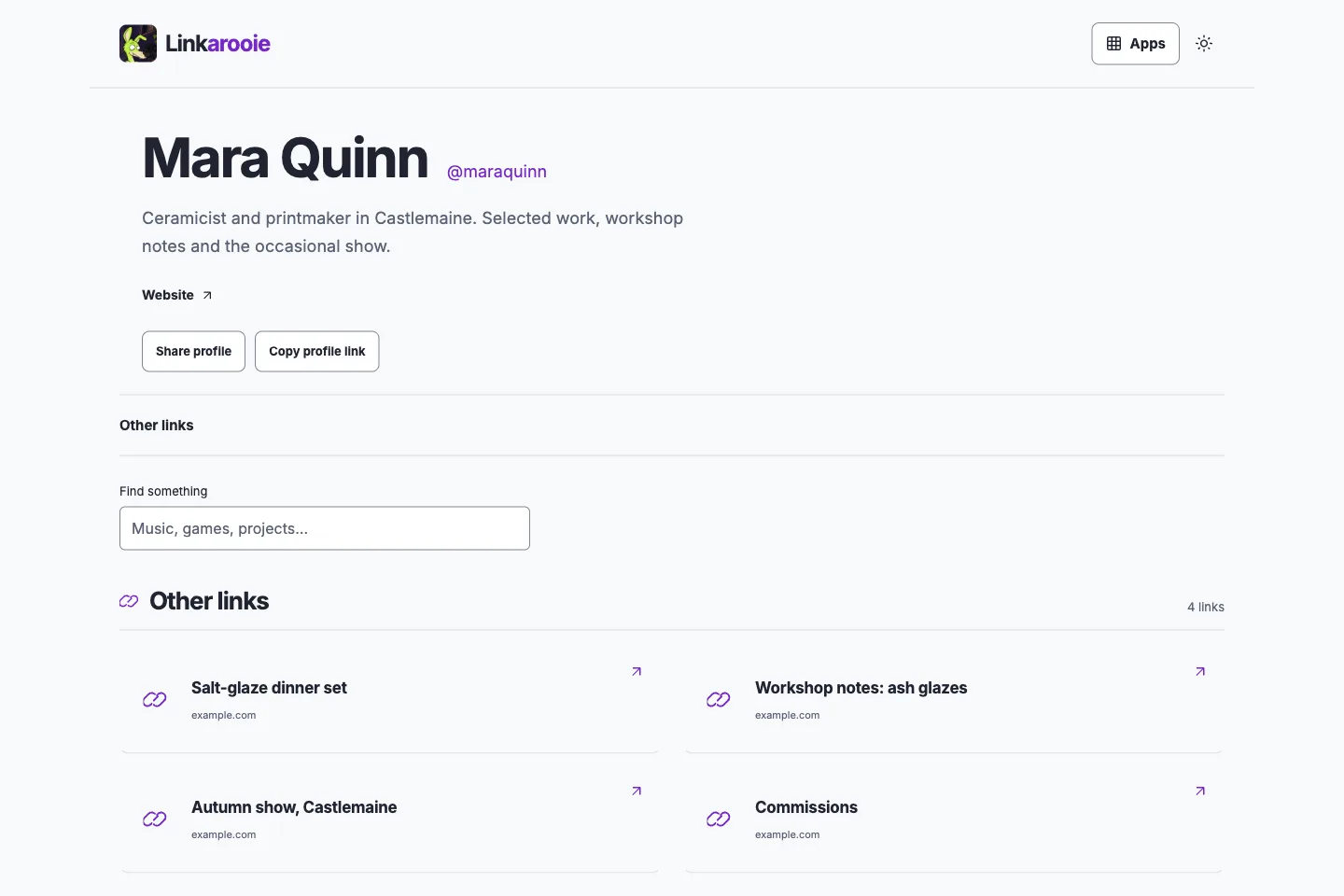
Mara Quinn’s profile. Four work links, two now pinned as featured picks. Approved guest contributions stay in Here / there until she features them here.
Release check at 22 Nov 2026, 10:22 am (Australia/Melbourne) returned revision 3d343e6cb424b1927f4a4485006f52b6f2913b89.
Get Ready. The agent checked the GitHub and Cloudflare access it already had. Nobody installed anything by hand for this build.
Describe and configure. Init exported a versioned specification for Guestbook + Linkarooie: the title, introduction, appearance, four work links and a review-before-publication rule. The form is the same one at /init.
Create. Each app was copied at its pinned commit into its own repository, with its own Worker and D1 database. Here / there also has its own R2 bucket. Nothing was merged into one project.
Publish. Here / there deployed first, because Linkarooie reads approved contributions from it through a service binding. Both answered on their own HTTPS hostnames and reported the revision they were serving.
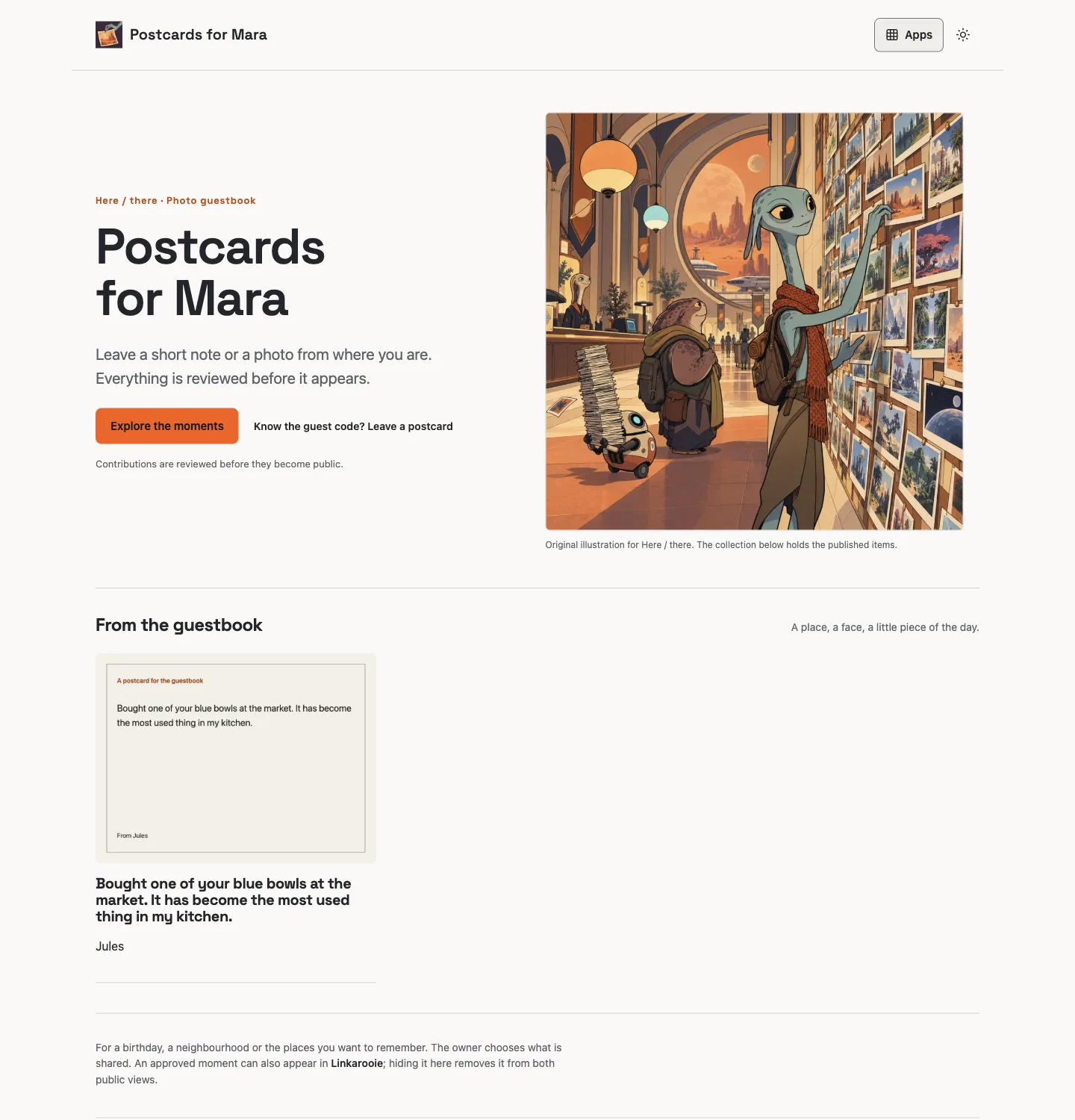
Manage. A guest opened the postcard form, wrote a note and sent it. It stayed private. The owner approved it in the native EmDash panel and featured it in Linkarooie; it became public in both apps.
Revoke. The owner hid the same contribution in the panel. It disappeared from both public views immediately, the guestbook item and media returned 404, and the card remained unavailable until a later approval.
This record describes the build on 11 November 2026 in the operator’s account. A different person’s build uses their own account, repositories and hostname, and their own owner credentials.
A second change, made the same way.
“Give my curated links more prominence while keeping my approved postcards available.”
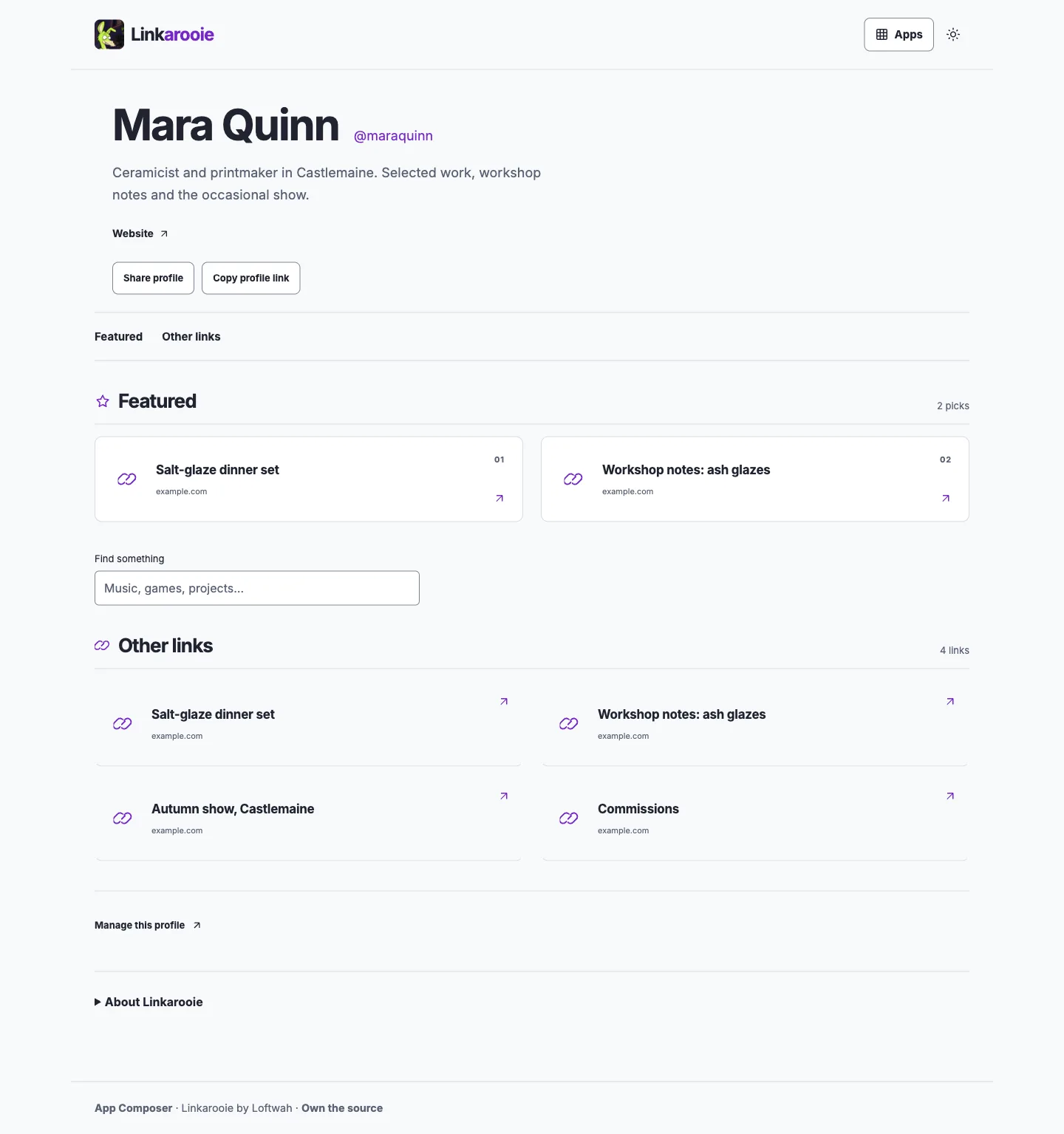
On 12 November 2026 Mara asked for a follow-up on the same fictional app. The agent used Linkarooie’s existing presentation control to pin two of her four curated links as featured picks, without a new build or a forked page. The live profile now opens with a numbered Featured section, while the full collection stays under Other links.
Live profile after the change, captured 12 November 2026. Same source, same four links, same account.
Before: no featured picks; all four links appeared under Other links. After: Salt-glaze dinner set and Workshop notes: ash glazes are featured as picks 01 and 02; Autumn show, Castlemaine and Commissions remain in the collection. The approved guestbook postcard was not edited, hidden or deleted. It still returns 200 at its Here / there item and media URLs and is still offered by the app’s provider source.
The change is a saved presentation setting, so it is reversible without a release: unpin the two cards in the owner studio and the previous view returns.
Verified against b7cd3b3e8f19dbbb76d33fb4266053da928cf586 at creator-hub.loftwah.com. The featured pins are stored by Linkarooie, not by App Composer.
From featured work to the guestbook
A visitor can now choose Guestbook postcards beside the profile’s Featured and Other links. The link opens this Creator Hub’s own guestbook, where visitors use the guest code and Mara reviews notes before publication.
A person signed in to Cloudflare, created the owner credential for each app, confirmed the hostname and decided that a contribution could be published. The agent handled repositories, databases, bindings, configuration, deployment and the checks after it.
Your agent gets the same plan in the exported handoff: an ordered list, each step labelled agent or human, so neither of you has to guess who is doing what. Init shows it before you copy anything.
Source. Two public repositories with their own history, manifests and release scripts. Either app runs without App Composer.
Data. Separate D1 databases and a separate photo bucket. Hiding a contribution is enforced by the app that owns it, not by a copy somewhere else.
Configuration. Title, introduction, theme, links and publication rules belong to the apps. A later source update does not overwrite them.
Export. Here / there exports its approved items and settings through its own owner API. Linkarooie exports its cards and profile settings.
Limits that still apply: code rollback is not data restore, an exported copy of a photo cannot be recalled once downloaded, and both apps here run on the operator’s account and domain rather than a customer’s.
Try the same starting point.
Try a sample draft with both apps selected. Replace the sample title and introduction with your own, add your links, then copy the build plan to your agent. Composer asks before replacing anything you have open and saves only when you choose Save draft.