 App Composer
App Composer · owner experience
Describe the app.
Get the tools to run it.
A public site is only half the job. The owner also needs a familiar place to publish, approve, configure, measure and keep the app current. App Composer wires that administration to the actual application instead of handing over another dashboard to maintain.
Owner surfaces sit behind the existing Cloudflare Access policy and EmDash roles. Public visitors cannot reach them.

01 / The request
A local club asks for a website and a way to run it.
“Build a local club site with news, a photo wall, links and an enquiry form. I need to approve photos, edit the welcome, see which links people use and keep the app up to date.”
That sentence contains a product request and an operations request. The website needs pages, a welcome message, a place for member photos, useful links and a way for people to get in touch. The owner needs moderation, editing, configuration, a private inbox, a connection check and an honest export. Neither half is useful alone.
App Composer keeps the work in the existing owners: Init for the brief and content model, the independent apps for their records and source, EmDash for the owner interface, and Cloudflare for the runtime and storage. The result is a composed stack with a public address and a separate owner workspace.
Supported now
- Saved stacks with draft, preview, publish and a shareable revision.
- Here / there photo contributions with pending review, approval and revocation.
- Linkarooie links, profile settings and collection from an approved source.
- A private enquiry inbox owned by the app, with retained-record limits.
- Page-level enquiry counts in the owner Inbox.
- Connection checks and approved-content export for a saved Here / there instance.
- Private workspace outcomes for recorded actions.
Needs configuration
- Each app's title, introduction, theme and declared settings.
- Who may enter the workspace as owner, editor or viewer.
- Whether a public enquiry form is open for a specific publication.
- Which contributions are approved, hidden or featured.
- Whether a stack is a draft, published or archived.
Not supported yet
- General self-service signup and a fresh customer workspace.
- Turning an arbitrary plugin, theme or Drupal site into a working app.
- A native news/pages collection wired into this stack. EmDash content authoring exists; this composed stack does not mount it as a page type.
- Notifications, replies or email delivery for enquiries.
- Full media recovery, point-in-time restore or account migration.
- Automatic code changes from a prompt without review and deployment.
02 / Two surfaces
The visitor sees the app. The owner sees the work.
The public page is deliberately quiet. It presents the club, its links and the approved contributions. The owner workspace is a separate address behind authentication, with the same app data underneath and no copied records in a second dashboard.
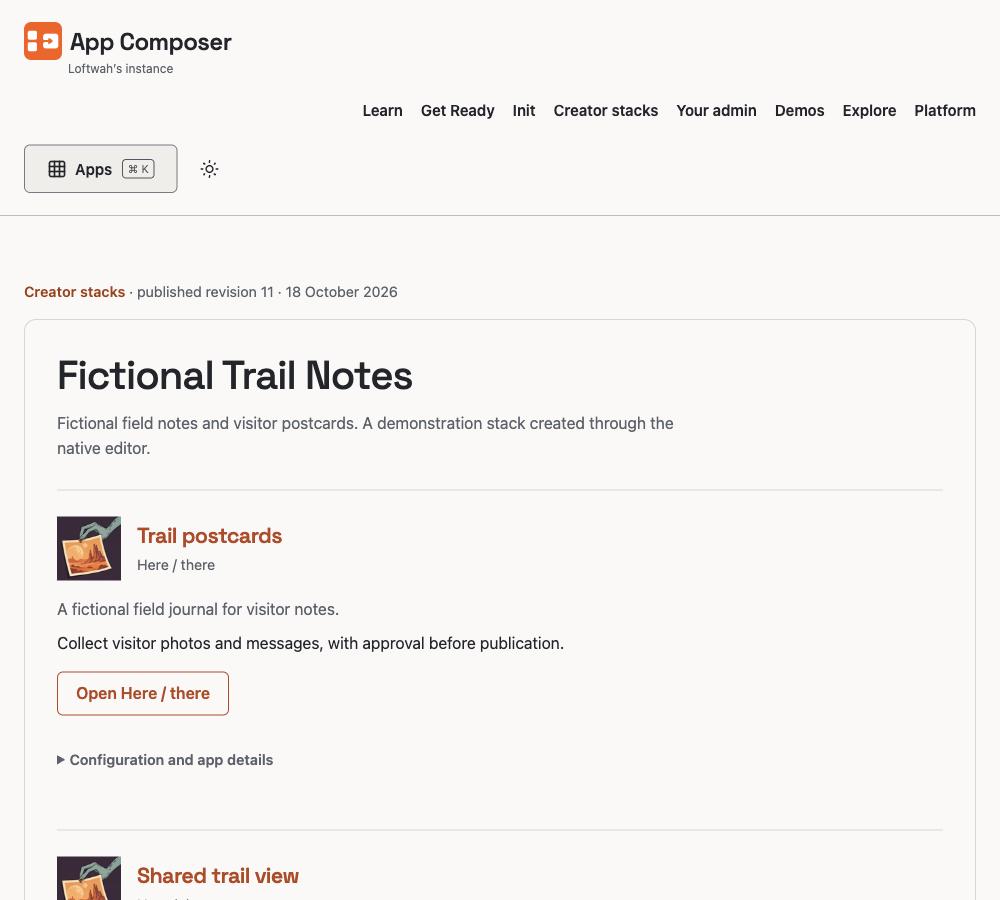
What a visitor can do
- Read a published revision without an account.
- Open a mounted app in the context of the stack.
- Submit a photo or a private brief only when the owner has opened that route.
- Use the page on a phone, with keyboard focus and both supported themes.
A published revision is immutable. Editing the draft does not change what visitors see until the owner publishes again.
What the owner can do
These are the current native surfaces. The Composer pages share the invited-owner Access boundary; app-owned studios keep their own owner authentication. Each surface names the app or workspace it acts on.
- Creator stacksEdit the composition, configure declared app settings, preview, publish, unpublish, archive, duplicate and export configuration.
- Private enquiriesRead retained briefs, mark reviewed or rejected, delete, export, and see counts by published page.
- Workspace outcomesInspect recorded opens and verified moderation transitions, with definitions, caps and missing history stated.
- Workspace maintenanceCheck a saved app connection and prepare an approved-content file with verified PNGs.
- Workspace accessPrepare editor or viewer invitations with expiry. Trusted-account acceptance remains separate.
- App-owned studiosHere / there and Linkarooie keep their own owner routes for photos, links and settings.
03 / The wiring
Each app keeps its data. Composer brokers the work.
The important boundary is not a logo on a dashboard. It is where the records live and who can write them. Here / there owns photo contributions and their private media. Linkarooie owns its cards and curation. Composer owns workspaces, saved stacks, publication revisions and the scoped operation journal. The bridge passes only the fields and actions each app declares.
- Describe and plan. The brief names the app and the owner work. Supported capabilities are separated from unsupported requests.
- Independent apps. Each app keeps its repository, release, records and owner API.
- Scoped bridge. Composer checks workspace membership, the exact publication, source and revision before an action.
- Owner admin. EmDash and the native Composer pages approve, edit, measure and export.
- Public result. A published stack serves the immutable public revision; drafts and owner controls stay private.
04 / The owner journey
From “make it” to “I can run it”.
- 1
Describe the app and the job.
Use Init to capture the purpose, content shape, apps, appearance and deployment intent. The brief is data. It does not grant execution or deployment authority.
- 2
See the plan before the build.
The supported stack is explicit: which apps exist, which settings they declare, which contributions can be moderated and which requested capabilities are still unsupported. A missing capability stays visible rather than becoming a dead menu item.
- 3
Build and wire the real pieces.
The authorised agent works in the independent repositories, verifies their source and tests, then binds a saved stack to the app-owned resources. Composer checks the current source and account before a configuration write.
- 4
Operate from the owner workspace.
Approve a photo, edit a link, change a welcome message, read a private brief, check a connection or prepare an approved-content export. The public page reflects only the published revision.
- 5
Change by describing the next job.
“Show me which page the enquiries came from” becomes a reviewable admin change. “Add moderation” becomes a reviewed app change where the app already supports it. Neither request silently widens permission or deploys unreviewed code.
05 / A second request
“Show me which page the enquiries came from.”
The first version could read one private brief at a time but could not show how many belonged to each published page. The owner Inbox now groups retained briefs by the exact published stack and app instance that delivered them, and shows reviewed, pending and rejected counts beside each page. The change is in Composer's admin; the briefs still live in the app.
Enquiries by page
| Page | Reviewed | Pending | Rejected | Total | Latest |
|---|---|---|---|---|---|
| Fictional Trail Notes · Trail postcardsPublished revision 11 | 2 | 1 | 0 | 3 | 21 Oct |
| Fictional Trail Notes · Shared trail viewPublished revision 11 | 1 | 0 | 1 | 2 | 20 Oct |
| Standalone visitor book | 0 | 1 | 0 | 1 | 19 Oct |
Fictional counts for the demonstration, not customer activity. “Reviewed” means an owner marked the brief. It is not a sale, a contact, a conversion or proof that anyone received a reply. Briefs expire after 30 days; the summary covers up to the 200 records Composer accepts from the export and says when that limit is reached.
App change
The public form belongs to one immutable publication and is opened by the workspace owner. Closing, archiving or replacing that publication closes the route without changing a separate standalone form.
Admin change
The Inbox asks the app for the retained export, validates the resource and source, and counts by provenance. It returns no submitted text, contact field or visitor identity in the summary.
06 / What is proved
Look at the live pieces, then read the limits.
What this does not prove
- A new person can sign up, create a workspace and deploy a customer app without an operator.
- Every WordPress, Drupal or arbitrary plugin feature has an equivalent.
- A private brief was answered, notified or converted into work.
- All app records and media can be restored after loss. Approved-content export is a bounded copy, not a backup.
- Physical-device, screen-reader, native social unfurl or external-provider acceptance.
The earlier administration screenshots remain available as historical production evidence. They are dated; this page describes the current surfaces rather than presenting an old capture as today's UI.
Start with the useful part
Describe what you need to run.
Start with Get Ready if the environment is not ready. Use Init when the app and its owner work are clear. Continue into Creator stacks when the pieces should become one published result.