
Media Studio · tutorial
Build and run your own media studio with App Composer
Make a studio for your own images, video and sound. This guide walks through the setup, your first creation and sharing the result, with help from your agent along the way. Jump to the first step.
- You need
- A Cloudflare account on Workers Paid and a supported agent. Fal.ai generation and provider rendering also need a funded fal.ai key.
- You do not need
- Docker, Wrangler, manual migrations or a database seed. The agent performs the technical work.
- Cost
- Hosting, storage and paid generation are separate costs. The two-project snapshot recorded about US$1.66; separate tests added US$0.50 and roughly US$1.08. An earlier Paper & Light run recorded about US$0.20. These are historical figures, not current prices or an invoice-confirmed bill.
- Time
- Allow an evening for your first build, including account setup and a first render. Later changes may take minutes.
Play this now
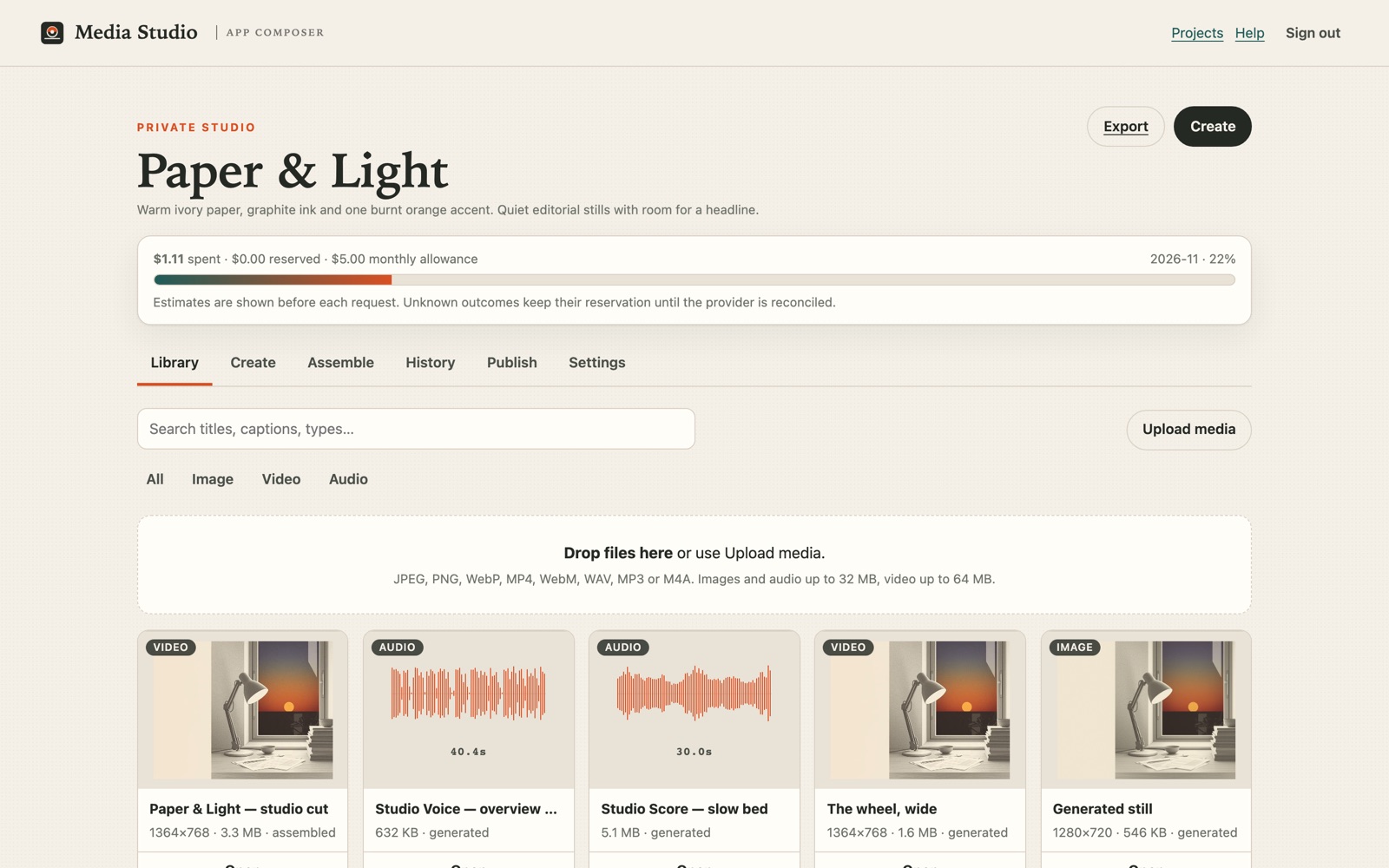
Four working stops from the same studio, in the order the chapters use them. The gallery, the published cut and the Composer stack open signed out; the chooser reads your own studio session.
- The public gallery — the catalogue these chapters produce, with real previews.
- The approved second cut — Cut 2 of the Pippa portrait, published after a private review.
- Compare models — the chooser, built from saved takes. How to read it →
- A published Composer stack — the same “change, save, reopen, publish” loop on the app side.
Quick start / TL;DR
Quick start
Build an independent studio for saved images, video and sound, or adapt the workflow to an app you already own. Your Cloudflare resources hold the work; optional model providers charge for their own requests.
- What you build
- An independent Media Studio Worker with its own D1 database, R2 bucket, owner-only workspace and public pages.
- What it does
- Keeps project originals and versions, makes stills and short clips with Workers AI and optional fal, saves storyboards, mixes browser audio and publishes deliberately.
- What you need
- Cloudflare account with Workers Paid
- Own D1, R2 and Workers AI bindings
- Supported Codex or OpenCode agent
- Optional funded fal.ai key
- Working result
- A deployed studio at your own origin where uploads, the library, a still or saved storyboard and public pages work. Paid provider paths are claimed only when funded, run and observed.
See the build and evidence · Studio source · Explore Share artwork
Reproduce this projectBuild my independent Studio
Help me build and operate my own independent Media Studio. Reference implementation: https://github.com/loftwah/composer-media-studio (MIT). Tutorial: https://composer.loftwah.com/media-studio/tutorial. Build story and evidence: https://composer.loftwah.com/media-studio. Read the current repository instructions, README and deployment notes; inspect and record the reviewed source commit before using it. Use the existing supported Codex or OpenCode agent and Get Ready where applicable.

Use my own accounts and resources. Do not assume access to the example author's projects, media, Cloudflare account, credentials or provider balance. Never put secrets in prompts, logs, commits or screenshots. Ask me to perform account sign-in and approve any new charges before they happen. Preserve existing data and publication settings.

Check my environment and Cloudflare account first. The current Studio pins Node '>=22.23.5 <23 || >=24.22.3 <25 || >=26.13.1 <27' and pnpm 12.19.0. It needs Workers Paid; the IMAGES binding also needs current Cloudflare Images entitlement and billing (error 9432 is the known trap). The studio needs a Worker, D1 database bound as DB, R2 bucket bound as MEDIA and Workers AI bound as AI. Follow the pinned Wrangler configuration for Darkroom: IMAGES for reference fitting, MEDIA_OPERATION with its Durable Object migration, and APP_ARTIFACTS pointing to the same private bucket as MEDIA. Have me enter OWNER_PASSPHRASE directly; do not invent, log or retain it. Set SESSION_SECRET securely. FAL_KEY is optional for fal-backed generation and edits. Set PUBLIC_ORIGIN to my own Studio origin. Set RENDER_ORIGIN to the Worker's workers.dev hostname (not the custom domain) so the render provider's signed reads are not blocked by edge bot or Access rules. Retain the '* * * * *' cron for job reconciliation, set MONTHLY_ALLOWANCE_MICRO to the cap I give you, and ask me for that allowance cap before any paid call. WOODHOUSE_SHARE and COMPOSER_ORIGIN are optional installation settings; never copy the example installation's public showcase list or access settings by default. For optional Composer entry, configure the supported scoped bridge with BRIDGE_SECRET and Composer's MEDIA_STUDIO_BRIDGE_SECRET and MEDIA_STUDIO_ORIGIN; confirm those Composer-side settings exist in the target deployment, otherwise use the standalone passphrase route and mark Composer entry untested. Ask me for the repository, Cloudflare account, Studio origin and domain, D1/R2/Worker names and allowance. Remove the example account_id, route, D1 ID, PUBLIC_SHOWCASE_SLUGS, LAUNCH_KIT_URL, PUBLIC_BUILD_URL and PUBLIC_STORY_URL, or replace each with my own destination. Use the exact reviewed commit named by the Init handoff you are given; if none is named, use '089e998f20abd3fe9993c84dcf01267327673c14' and record it, and do not mix a legacy brief pin with current capability claims. Apply every migration present at that pin (0001–0025 at the current fallback pin) in order, deploy with 'pnpm run deploy -- --migrate', and do not replace existing resources. The independent Worker owns its D1 projects, jobs, allowance and publication records and R2 originals and outputs. Retain the single budget and job authority. Supported paths include uploads, library, Workers AI stills and reference variations; fal-backed masked fill/outpaint, cutout, upscale, image-to-video and sound; saved storyboards and browser audio mix. Song plans retain manually timed caption cues, export SRT or WebVTT, and a matching saved storyboard can burn those saved captions into a local MP4 on a compatible device; there is no automatic transcription. Keep originals and versions. Publishing and withdrawal are deliberate; any automatic first-party gallery publication requires its separate opt-in and rights confirmation. Fal features require my own funded key and an approved request. The documented fal compose route has returned a provider 403; show it as unavailable until actually proved, and do not retry paid failures or present locally finished output as an in-product render.

Run the repository's focused checks and the existing guarded deployment for my owned target. Verify the deployed source identity and a real affected user journey. Check signed-out private API denial, authorised project boundaries, budget and publication/withdrawal. Show me the actual links and results, and explicitly list anything untested or blocked. Do not create a second generation queue, credential store or destructive migration.
Use your keyboard shortcut or your device’s copy menu to copy the selection.
Add to my existing appAdd Studio to my current application
Help me add Media Studio capability to my existing app without overwriting its code, data, authentication or deployments. Reference implementation: https://github.com/loftwah/composer-media-studio (MIT). Tutorial: https://composer.loftwah.com/media-studio/tutorial. Build story and evidence: https://composer.loftwah.com/media-studio. Read the current repository instructions, README and deployment notes; inspect and record the reviewed source commit before using it. Use the existing supported Codex or OpenCode agent and Get Ready where applicable.

Use my own accounts and resources. Do not assume access to the example author's projects, media, Cloudflare account, credentials or provider balance. Never put secrets in prompts, logs, commits or screenshots. Ask me to perform account sign-in and approve any new charges before they happen. Preserve existing data and publication settings.

First inspect my app, hosting, existing identity and grants, then propose the smallest integration that fits them. Prefer an independently owned Studio with its own Worker, D1 (DB), R2 (MEDIA), Workers AI (AI), OWNER_PASSPHRASE and SESSION_SECRET. FAL_KEY is optional. For a supported Composer installation, use the existing short-lived scoped handoff and BRIDGE_SECRET / MEDIA_STUDIO_BRIDGE_SECRET, with server-side current-grant checks. Do not claim a generic app has Composer grants: if no supported bridge exists, use the standalone sign-in and explain the gap. The independent Worker owns its D1 projects, jobs, allowance and publication records and R2 originals and outputs. Retain the single budget and job authority. Supported paths include uploads, library, Workers AI stills and reference variations; fal-backed masked fill/outpaint, cutout, upscale, image-to-video and sound; saved storyboards and browser audio mix. Song plans retain manually timed caption cues, export SRT or WebVTT, and a matching saved storyboard can burn those saved captions into a local MP4 on a compatible device; there is no automatic transcription. Keep originals and versions. Publishing and withdrawal are deliberate; any automatic first-party gallery publication requires its separate opt-in and rights confirmation. Fal features require my own funded key and an approved request. The documented fal compose route has returned a provider 403; show it as unavailable until actually proved, and do not retry paid failures or present locally finished output as an in-product render.

Run the repository's focused checks and the existing guarded deployment for my owned target. Verify the deployed source identity and a real affected user journey. Check signed-out private API denial, authorised project boundaries, budget and publication/withdrawal. Show me the actual links and results, and explicitly list anything untested or blocked. Do not create a second generation queue, credential store or destructive migration.
Use your keyboard shortcut or your device’s copy menu to copy the selection.
Understand how it worksExplain this implementation
Explain how this Media Studio works for someone who wants to own and change it. Reference implementation: https://github.com/loftwah/composer-media-studio (MIT). Tutorial: https://composer.loftwah.com/media-studio/tutorial. Build story and evidence: https://composer.loftwah.com/media-studio. Read the current repository instructions, README and deployment notes; inspect and record the reviewed source commit before using it. Use the existing supported Codex or OpenCode agent and Get Ready where applicable.

Use my own accounts and resources. Do not assume access to the example author's projects, media, Cloudflare account, credentials or provider balance. Never put secrets in prompts, logs, commits or screenshots. Ask me to perform account sign-in and approve any new charges before they happen. Preserve existing data and publication settings.

Trace a reference from upload through generation, job admission, saved output, publication and withdrawal. Explain Worker, D1, R2, Workers AI, optional fal, cost reservations, Composer's scoped access and what a project export does not include. Distinguish working behaviour, provider-dependent behaviour and the documented compose 403 from aspirations. Link the source files supporting each claim and identify anything you cannot verify. Do not change or deploy anything.
Use your keyboard shortcut or your device’s copy menu to copy the selection.
Take the next stepMake a still or clip from my approved reference
Help me make a still or short clip in my own Media Studio from media I am allowed to reuse. Reference implementation: https://github.com/loftwah/composer-media-studio (MIT). Tutorial: https://composer.loftwah.com/media-studio/tutorial. Build story and evidence: https://composer.loftwah.com/media-studio. Read the current repository instructions, README and deployment notes; inspect and record the reviewed source commit before using it. Use the existing supported Codex or OpenCode agent and Get Ready where applicable.

Use my own accounts and resources. Do not assume access to the example author's projects, media, Cloudflare account, credentials or provider balance. Never put secrets in prompts, logs, commits or screenshots. Ask me to perform account sign-in and approve any new charges before they happen. Preserve existing data and publication settings.

Ask which project and source I want to use and whether I want a still or a clip. Check my actual project grant and reuse permission; public visibility alone is not permission. Import the eligible original into my project or upload my own file, retaining source and credit. For a still choose a supported reference variation or masked edit; for a clip choose an available image-to-video model and duration. Show the actual provider, input, estimated cost and remaining project allowance before any paid request. Never silently use the example owner's key or balance.

For a concrete illustration of the workflow, inspect the published example: Woodhouse Share original https://woodhouse.loftwah.com/api/v1/assets/poster-study-fighter → one H3 Max Turbo five-second request → saved 5.2-second 768 × 960 MP4 → https://media.loftwah.com/p/QXaKw_fL9cZenKCg. Studio estimated US$0.24 for that historical request, not an invoice or current quote. It is generated motion from an illustration, not gameplay. This example is evidence, not a licence to import it into my project.

After my explicit approval, make at most the one requested generation. Preserve the original and each saved variant; inspect the real output in my library. If a provider fails or the outcome is unknown, retain the job and reservation and do not submit it again. Publish or export only when I choose it, with a truthful description and credit. If no paid provider is available, keep upload/library/download usable and report the limitation; do not substitute a mock. Report the source, job, estimate and output links I am authorised to see.
Use your keyboard shortcut or your device’s copy menu to copy the selection.
Open a prompt to read it before copying. The copied text is exactly the text in the panel. If the copy button is unavailable, select the text and copy it manually.
Direct scenes, sound and finished pieces with the creative field guide →
The walkthrough film follows these chapters. Timestamps below refer to the illustrated film.
The path
Every stage, and where it happens
Each row names the control you use and the result that tells you it worked. The chapters below follow the same order, with a recovery case for each stage.
| Stage | Where | What proves it |
|---|---|---|
| 1 · Brief | Init → Media Studio → Use this starting point, then the fields and Save draft | A saved specification at revision 3. Saving or exporting provisions nothing. |
| 2 · Handoff | Copy agent handoff | A pinned forty-character commit, the D1, R2 and Workers AI bindings, and the human-only steps. |
| 3 · Build | Your agent, in your own project and Cloudflare account | /healthz returns the exact commit that was deployed. |
| 4 · Enter | The Composer menu, or Open your studio | Your projects load; a signed-out private route returns 401. |
| 5 · Source assets | Library → upload, or Import from Woodhouse Share with an asset ID | The file, its dimensions or duration and a hash. An import keeps its source credit. |
| 6 · Edit | Create → a saved still → Masked fill, Remove background or Upscale ×2 | A new variant beside the original. The source, mask and result keep separate hashes. |
| 7 · Direct | A scene from the creative field guide, then the scene fields in your project | A changed take that keeps the approved subject and setting, saved as a new revision with the earlier one intact. |
| 8 · Review the model | History → a comparison, with the source still shown beside each take | A visible pick and the source still together, so you can attribute a scene change to the model rather than the prompt. |
| 9 · Render | Assemble → two to six takes, up to four tracks, mix, then render | A saved MP4 with real dimensions, duration and take count. Reconcile re-reads the same provider result. |
| 10 · Publish | A saved asset → Publish page | The page opens signed out. Show/hide, make private and delete stay separate actions. |
| 11 · Review | Review → Create a private review link for one exact saved cut | The reviewer plays that version, leaves timecoded notes and records a decision pinned to its SHA-256. Approval is feedback, not publish permission. |
| 12 · Revise and prepare | Make the second cut, import it, review that version, then publish that exact asset | A new asset with its own hash and its own decision; the earlier cut and its room are unchanged. |
| 13 · Recover | studio-project.mjs export, inspect, then import into a separate target | The sealed bundle opens with the project, assets, plans and captions. A Composer bridge session cannot run it; it needs the standalone owner passphrase. |
| 14 · Return | Ask the same agent for one change to the same app | The new behaviour, the earlier renders still attached, and a live revision that matches the commit. |
Current limits: the provider compose route refuses new jobs with 403, and the conversational Producer and named characters remain open. The scoped Studio MCP server is shipped: OpenCode and Codex can read and edit one granted project, including the revision review below. The model freshness record holds the checks behind the current still and video choices, including the retired SDXL Lightning route.
01 · Understand the target app
What you are building
- You
- Decide what the studio is for and where its data will live.
- Your agent or the studio
- Composer holds the brief; the studio app owns the projects and media.
- Look for
- A clear answer about ownership before any account work.
Your studio will have its own source, storage and release on Cloudflare. Your projects, job records and media stay with that app, and you can change it as your needs change.
Composer helps you prepare the brief and open the studio. This build uses Cloudflare Workers AI for stills and fal.ai for video, sound and provider renders. You keep the source, data, media and publication pages.
02 · Accounts and the supported agent
Set up your accounts
- You
- Sign in to Cloudflare and start your agent. Add fal.ai credit if you want to use its paid tools.
- Your agent or the studio
- The agent prepares the technical environment; it never creates accounts or spends for you.
- Look for
- A Cloudflare account and an agent that can run commands.
Start with your Cloudflare account and an agent that can run commands. You control account creation, terms and spending.
- Create or sign in to your Cloudflare account and confirm Workers Paid with Containers if you intend to use the Oyster route. The independent studio needs Workers Paid and Workers AI. Its Darkroom reference fitting also needs the Images binding on an account with current Images billing.
- For fal-backed video, sound, image edits or provider assembly, create a fal.ai account and add credit. Those requests are billed there.
- Start a supported agent (for example a coding agent with terminal access) in an empty project directory and connect it to Composer's Get Ready.
Ask the agent to check the environment first; do not hand it the build brief yet:
Check this machine and my connected accounts with App Composer's Get Ready. Do not create or deploy anything yet. Tell me what is missing, then wait while I handle sign-in or billing.You'll choose the brief and pinned source in Init, then hand them to your agent in chapter 05.
Your agent can prepare the repository, configure the app, run migrations and deploy it. Keep secrets out of chat, screenshots and source files; enter them through the provider’s secret storage.
03 · Get Ready
Check the machine before building
- You
- Run Get Ready and read the report.
- Your agent or the studio
- Checks the runtime, package manager, repository tools and accounts.
- Look for
- Every check named, with a real pass or fail.
Init includes Get Ready. It checks the local runtime, package manager, repository tools and accounts your agent needs, then reports anything missing.
Read the result before continuing. If your Node version is unsupported, install a supported version and run the check again.
Get Ready does not create resources in your cloud account or require a subscription.
04 · Choose Media Studio in Init
The brief
- You
- Choose Media Studio, set the defaults, write the brief.
- Your agent or the studio
- Validates the draft and builds a portable specification.
- Look for
- A live preview and a spec panel that updates with your choices.
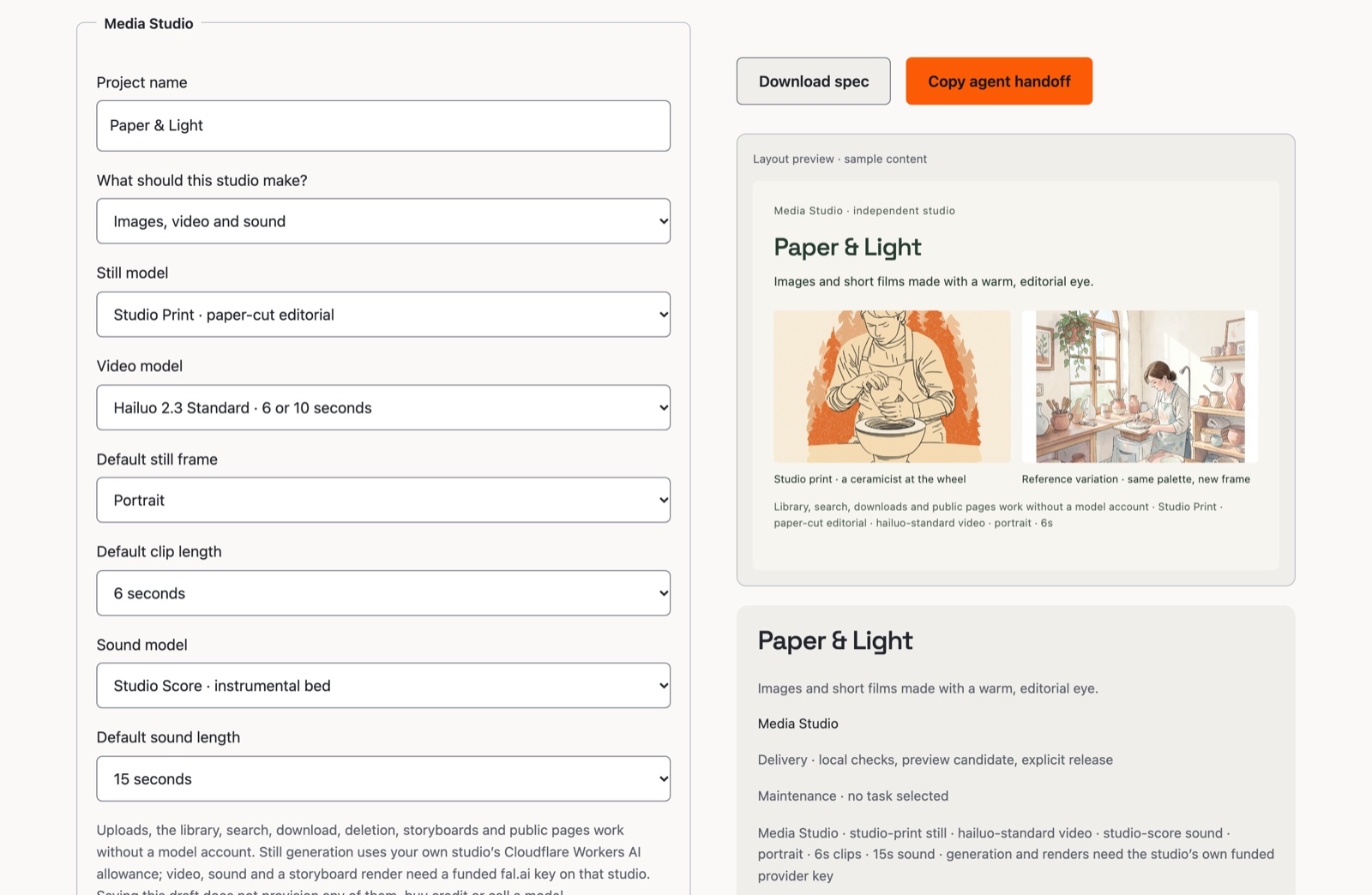
Open Init → Media Studio. The recommendation is a preview until you select Use this starting point; then choose what the studio should make, the still and video models, the default frame and clip length, and the sound model and bed length. Name the project. None of this buys anything.
Today’s still choices are Studio Print, Studio Film, Studio Draft · FLUX.2 Klein 9B and Studio Quick, plus a FLUX.2 Klein reference variation. SDXL Lightning was retired on 15 November 2026 and is not offered for new work.
Write the intent in your own words. The sentence used for this build:
Build me a media studio for images, video and sound using my providers, with projects I can save and return to. Give it its own Cloudflare account resources, its own storage and its own release, and open it from my App Composer menu.The exported specification carries your choices. Revision 3 is current: it maps the retired Studio Draft choice to FLUX.2 Klein 9B with a visible recovery notice. Revision 2 added the sound defaults, and revision 1 drafts still load.
 Open full-size image
05 · Save and hand off the brief
Save the brief for your agent
- You
- Save the draft, export the spec, copy the agent handoff.
- Your agent or the studio
- Pins the source commit and lists the bindings, build plan and human-only actions.
- Look for
- A JSON file that round-trips, and a handoff naming an exact commit.
Save the draft, download the specification, and copy the agent handoff. The handoff pins the studio repository and commit, names the storage and secret bindings, states the build plan and separates the human-only actions from the technical ones.
Now give the saved brief to the supported agent:
Use the saved Media Studio specification and the pinned source in this handoff. Create my own copy, apply every migration in order, set the secrets yourself without printing them, deploy, and read back the live revision. Then walk me through the one account step only I can do.Keep the draft. Exporting does not publish anything, and importing a different specification later does not overwrite your saved draft until you choose to save it.
The example brief from this run is available as a starting point.
06 · The agent builds and deploys
Build and deploy the studio
- You
- Approve the one account step only you can do.
- Your agent or the studio
- Creates your copy, applies migrations in order, sets secrets, deploys and reads back the revision.
- Look for
- A live /healthz that returns the commit your agent shipped.
Your agent creates your copy of the studio, applies every migration in order, sets the secrets, deploys and reads back the live revision. On this run the release script refused a dirty tree, checked the pinned source, ran the focused tests, deployed, then compared /healthz to the commit it had shipped.
The build hit two technical problems. The details are here if your agent needs them:
Migration and sign-in details
- Migrations are ordered and data-preserving. The audio release rebuilds two tables to widen a constraint; it copies every row and restores parent links in a second pass, because the production database enforces foreign keys.
- The handoff expiry must match units. Composer mints a short-lived token; the studio compares milliseconds. A mismatch rejects a correct handoff as expired. Both sides now normalise.
07 · Enter through Composer
No second password
- You
- Open the studio from the Composer menu.
- Your agent or the studio
- Exchanges the EmDash session for a short-lived studio handoff.
- Look for
- Your projects, and private routes that return 401 signed out.
Open the studio from the Composer menu or Open your studio. Composer passes your workspace, selected project and permitted actions to the studio through a short-lived handoff. The studio creates its own project-scoped session; your browser does not receive the studio owner passphrase or provider keys.
Email and passkeys: our selected sign-in improvement uses Cloudflare Access's native email codes and passkeys. Account binding and the live login rollout are still being completed; use this installation's existing sign-in method until the new options are enabled. The integration brief explains setup and recovery. No Pocket ID server or Tailscale installation is required.
Signing in is not the same as being granted a resource. Read, edit, generate, publish and admin are separate. The studio re-checks the current Composer grant on the server before a privileged action, so revoking a member stops the next dispatch even if their tab is still open. A signed-out request to a private route returns 401; a signed-in account without the grant gets a clear denied page, not a hidden menu item.
You can also use the independent studio directly with its owner passphrase. The Composer route does not need that second sign-in.
Open full-size image08 · Create and edit video and sound
Make your first asset
- You
- Pick a model, write the direction, confirm the estimate.
- Your agent or the studio
- Sends the request and saves the result with its source and estimated cost.
- Look for
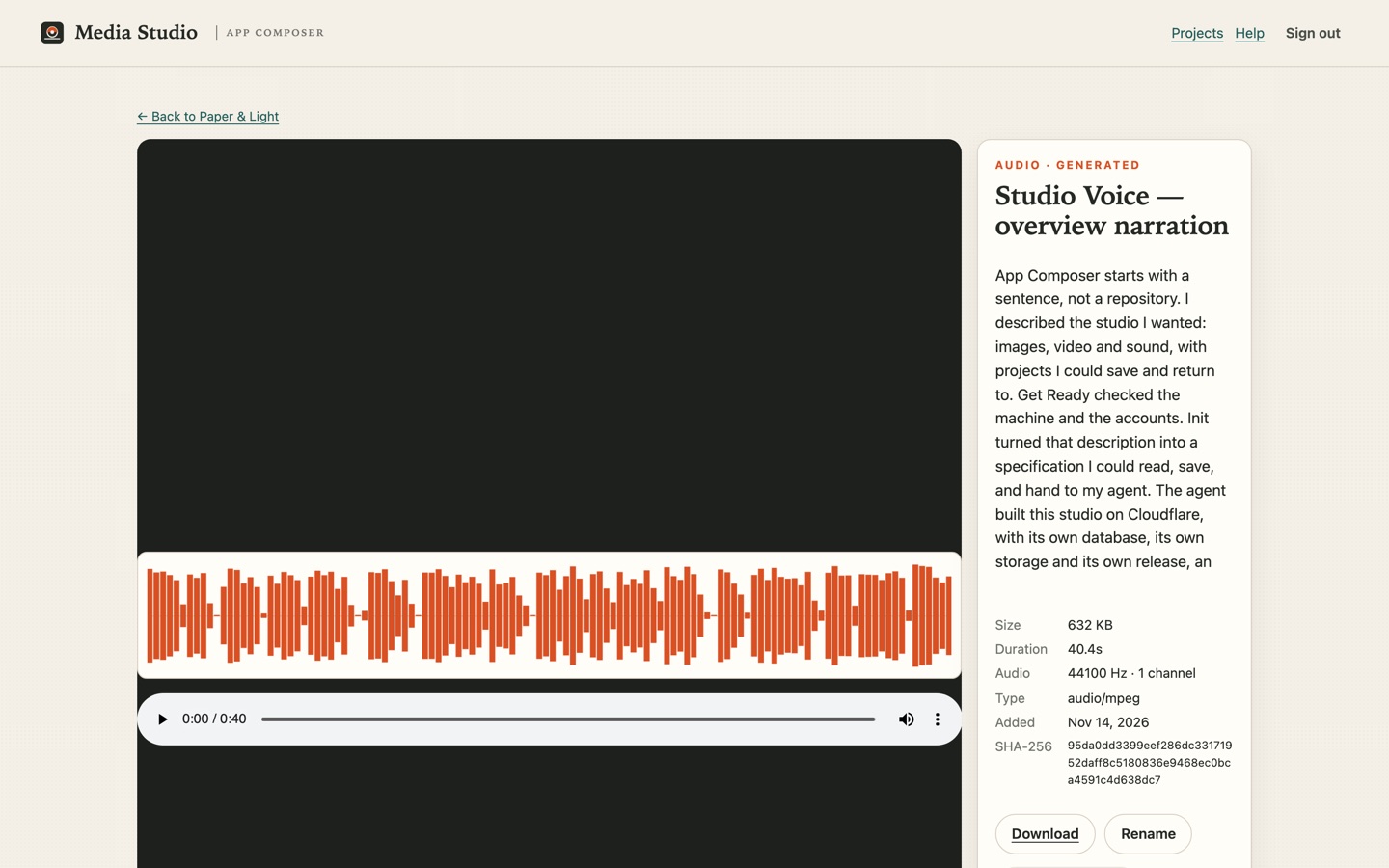
- A saved still, clip or sound file. Audio shows a waveform and its duration.
Start by uploading an image, clip or sound file. The studio records the dimensions or duration and a hash with each file. Then open Create:
- Pick a still model and a frame. Read the estimate before you confirm.
- For a real edit, choose Masked fill, paint the area to change, save the mask, then send the fill. Remove background and Upscale ×2 are separate variants; the original stays.
- To animate, choose a saved still and one motion instruction. Video is asynchronous: you can close the browser.
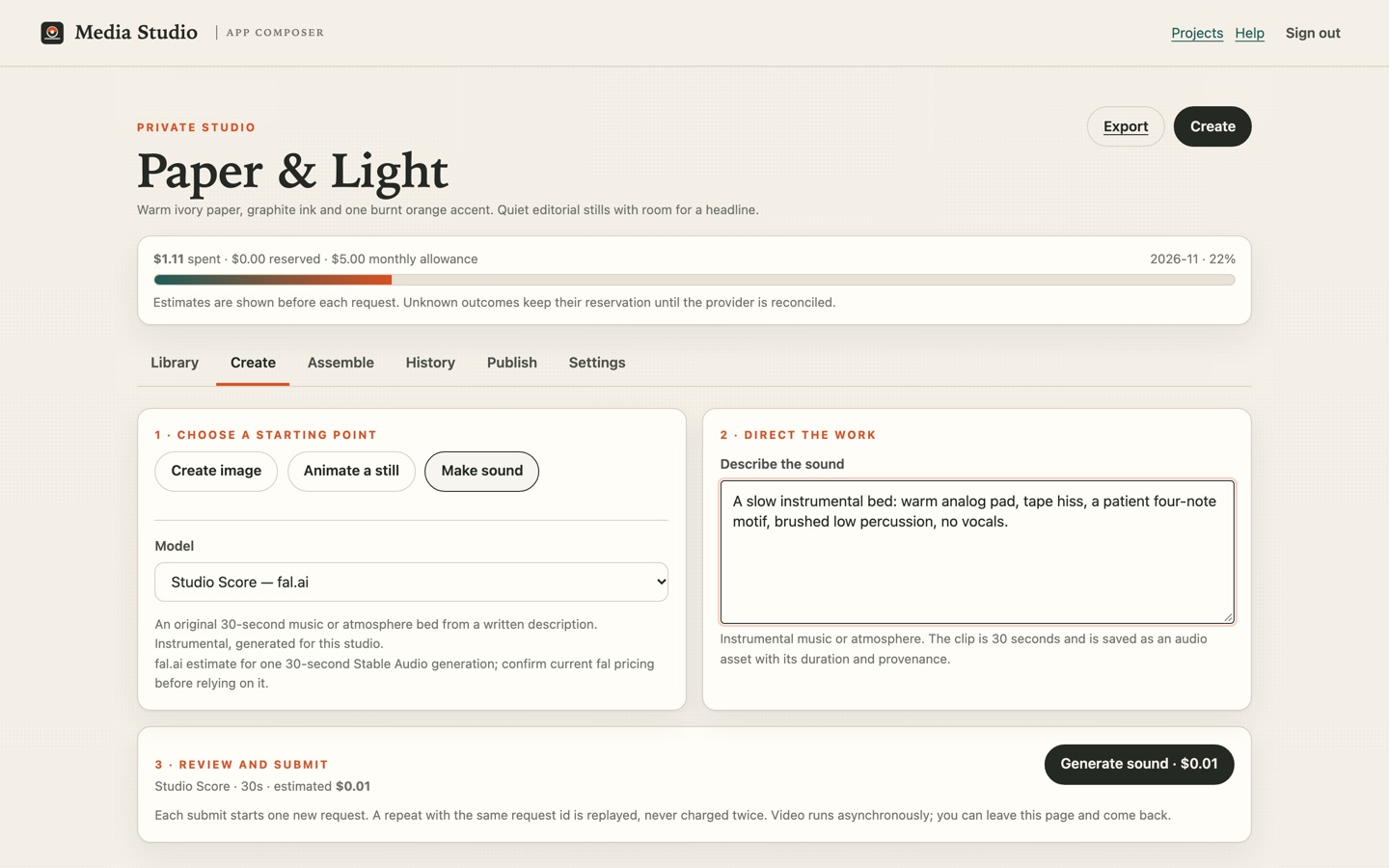
- For sound, choose Make sound, pick Studio Score, Studio Voice or Studio Effect, write the direction and choose a length.
A slow instrumental bed for a short studio film: warm analog pad, tape hiss, a patient four-note motif, brushed low percussion, no vocals, clean ending.The sound is saved as its own asset. Its duration, sample rate, channels and source are recorded, and its waveform comes from the decoded file.
 Open full-size image
 Open full-size image
09 · Assemble, export and publish
Assemble and share your cut
- You
- Order the takes, add the bed, render, then publish deliberately.
- Your agent or the studio
- For a provider render, creates short-lived file links and saves a successful result to your bucket.
- Look for
- An assembled MP4 with real duration and take count; a public page that loads signed out.
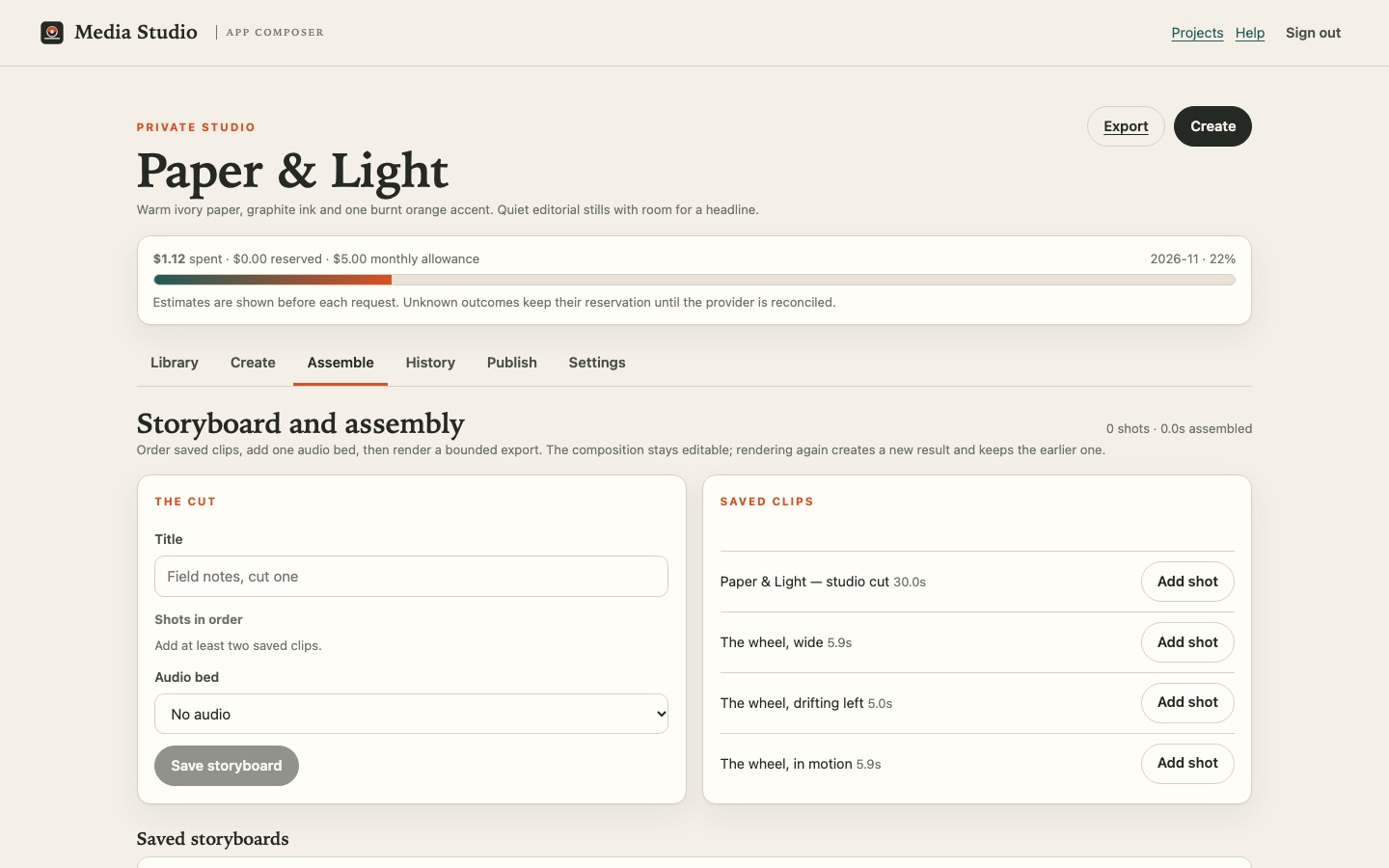
Open Assemble. Add two to six saved takes in order, add up to four saved music, narration or effect tracks, set trim, gain and fades, and mix the soundtrack. The browser makes a new WAV mix and keeps the separate tracks and their settings. Save the storyboard to keep editing it later; earlier renders stay attached.
The 9:16 option was designed to make a vertical opening and place your selected takes after it in order. During this build, fal.ai refused the compose request with a 403 permission error before reading the files. The studio kept the job and offers Reconcile, which checks that same request without sending another paid job. The 9:16 example in the article was finished locally from the saved takes and sound; it was not made with the blocked provider control.
There is also a separate on-device MP4 renderer for saved storyboards in compatible browsers. It uses the saved mixed soundtrack and mutes the original clip audio. It does not repair the provider’s 9:16 compose route.
When you are ready to share, check which action you need:
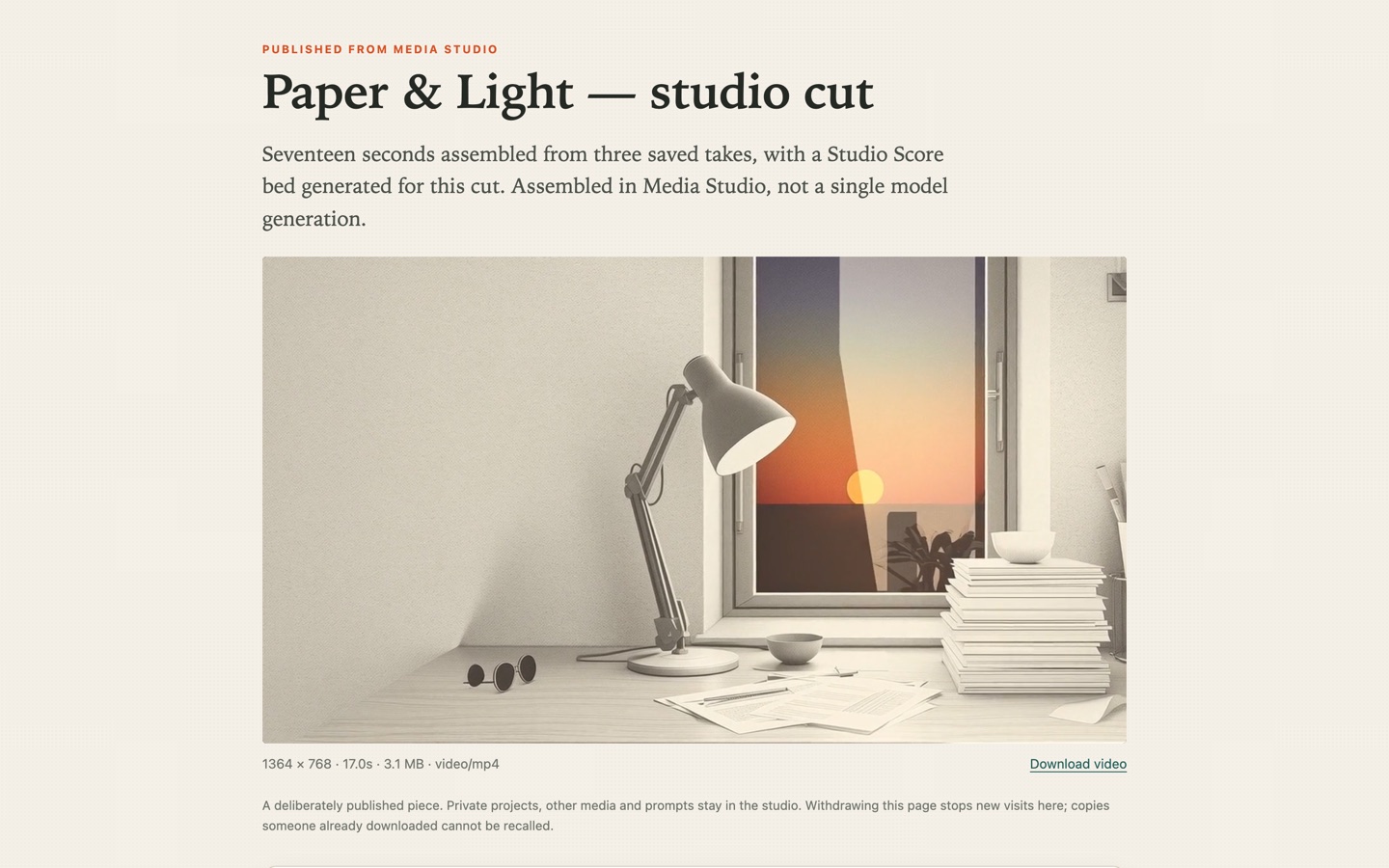
- Publish / unpublish: create or withdraw a public page. Withdrawal stops new visits, but cannot recall a file someone already downloaded.
- Show / hide: add or remove the card from discovery. Hiding it does not make the direct link private.
- Make private: remove the media from public pages while keeping the originals in your library.
- Delete: remove the file bytes and mark the publications that used them as deleted.
 Open full-size image
 Open full-size image
11 · Review a cut privately
Show one exact cut, not the whole studio
- You
- Choose the saved cut, label the version and send one private link.
- The reviewer
- Plays that version, leaves timecoded notes and records a decision.
- Look for
- Comments attached to the SHA-256 of that cut, and a decision that names the version.
Open Review in your studio. Choose one saved image or film, give the version a label such as Cut 1 · 9:16 · 4.2s, choose how long the link lives, and select Create private review link. The room pins the bytes it was created from; it does not export the media or open the rest of your library.
The reviewer sees a player, a name field and a comment box. Pausing and choosing Use current time attaches that moment to the note, so “the ear leaves frame” carries 0:01.2 instead of a paragraph. They finish with Request changes or Approve this version. Their decision belongs to that saved version only.
Approval is feedback, not permission. It does not publish, schedule, spend or delete anything, and a new cut never inherits an earlier approval. You publish the exact asset you intend to share.
12 · Revise and prepare to share
Make the second cut, then publish that exact version
- You
- Apply the note, import the new cut, review it and publish it.
- The studio
- Keeps the first cut, its room and its decision; the new cut gets its own hash.
- Look for
- Two saved cuts side by side, an approved second version, and a public page that plays it.
Use the note rather than starting over. In the clip and frame tool, pull the start point in by the amount the reviewer named, keep the 9:16 crop, and make a new MP4. The tool works on your device; only an explicit Import to Studio uploads the finished file, and it becomes a new private library asset.
Create a second review room for that new asset, send the same link style to the same reviewer, and let them approve that version. Then use Publish page on the approved asset. Title and description are the only public words; prompts, other projects and private filenames stay private.
The owner's copy of this walkthrough made two real cuts from an approved Pippa still: Cut 1 at 4.2 s drew a note about the crop at 0:01.2 and a change request; Cut 2 at 4.0 s was approved and published at media.loftwah.com/p/oCE3jwInl-G55yXf. The first cut and its review stayed exactly as they were.
13 · Recover the editable project
Keep a copy that can be opened somewhere else
- You
- Run one export with the studio's standalone owner passphrase.
- The bundle
- Project, assets and bytes, plans, captions, compositions and publications, with a hash for every file.
- Look for
- A manifest that inspects cleanly and an import that verifies every hash before writing.
A Composer bridge session is deliberately not enough for a full export. Sign in to the studio as the standalone owner and run the maintained CLI from the studio's own repository:
STUDIO_PASSPHRASE='…' node scripts/studio-project.mjs export \
  --studio https://media.loftwah.com --project prj_… \
  --out pippa-project.studio.zip
node scripts/studio-project.mjs inspect --in pippa-project.studio.zip
node scripts/studio-project.mjs import --in pippa-project.studio.zip \
  --studio https://restore.example --confirm
Import rewrites identifiers and verifies each blob's SHA-256 before one D1 batch commits it. A second import of the same bundle reports already_imported instead of duplicating it. Publications restore withdrawn or unlisted with new slugs, so an old public URL is never silently claimed by a restored copy.
The bundle carries the editable work: plans, captions, directions, takes and their sources. Review rooms, reviewer decisions and render receipts are not in it; those belong to the installation that recorded them. Restore to a genuinely fresh D1 and R2 target is still Studio #157 work; export and inspection are the validated part today.
Choose a model
Pick for the job you are about to do
Compare models opens on the job that already has saved takes in your studio, not the first job in a list. It is built only from work you kept: opening it never calls a provider or spends money. Blind review hides model names and costs until you pick a take, so the first judgement is about the result.
Every take shows its brief, source still, size, length and output hash. The three money fields stay separate: the estimate, the studio's allocation, and the provider's own charge, which reads “not reported” unless the provider actually said. Takes made from a different brief are listed as saved, but not comparable rather than ranked.
Use the tab counts to see where evidence exists, and copy the review as JSON when a decision needs to be recorded outside the browser.
Drive the same revision from your agent
The studio also exposes a scoped MCP server at /mcp. Add that URL to a compatible agent, sign in, choose one project and grant only the scopes you need. Read access includes saved plans, prompts and exports; edit, generate and publish are separate. The agent gets the same project and revision the browser shows, not a parallel copy.
# OpenCode V2: request edits explicitly before signing in.
# opencode.jsonc
"media-studio": {
  "type": "remote",
  "url": "https://your-studio.example/mcp",
  "oauth": { "scope": "studio.read studio.edit" }
}

opencode mcp logout media-studio
opencode mcp auth media-studio
On a saved song plan, tick the scenes and use Prepare private brief in the Creative Director panel. Give that brief to the agent. It reads the saved plan, calls studio_preview_scene_proposal and returns the typed before/after changes. Paste the result into Paste the agent’s typed proposal, review it, untick any change you decline and apply the rest. Nothing is saved until you choose Save scene plan.
The exact proof in this build: revision 5 → private brief → agent preview pinned to revision 5 → declined scene 3 → applied scene 2 → saved revision 6 → the same agent read revision 6 back. Spend stayed at $0.00 because no media provider was called. The MCP receipt records the ids, hashes and the exact direction.
The agent connection is a bearer capability scoped to one project. Revoke it at Agent connections; tokens expire after 30 minutes. Do not paste a token into a prompt, repository or screenshot.
14 · Return and change it
Make a change and check it
- You
- Ask for a change you actually want.
- Your agent or the studio
- The same agent changes the same application and releases it.
- Look for
- The new behaviour, with earlier projects, cuts and renders still there.
In this build, the Assemble tab could not see saved storyboards, and audio beds were always thirty seconds long. The agent fixed both in the same application; the projects stayed in place.
After that release: choose a bed length of 10 to 30 seconds, edit a storyboard in place, and see when a cut has changed since its last render. Earlier renders stay attached.
To check the change, reopen the project, play the earlier cut and the new one, and compare their durations. Reopening reads the saved files without generating again.
A real example
Make a clip and poster
Watch a Pippa animation become a four-second portrait clip and a poster in the free clip and frame tool.
Fighter, with music
We clipped Fighter gameplay and added music using Studio’s local tools, then exported this 720p film.
Trim a song on your device
We opened the full 4½-minute After Hours by LoftwahFM, selected fifteen seconds and added fades in the audio trim tool.
Illustrated walkthrough
Watch the walkthrough
This illustrated film uses Studio and Composer screenshots from the original build. In today’s Init, select Use this starting point before filling out the Media Studio fields. The film does not record every live interaction or provider request. The player has captions and the transcript lists the chapters.
The film is an edited guide using Studio and Composer screen images. The overview film is on the build article.
Technical reference · for operators
Exact commands and checks
This section is for the person or agent operating the deployment. You do not need it to use the studio, and it is not the beginner path.
For sign-in, read the Cloudflare Access integration guide: it covers account binding, human and agent credentials, public/private routes, the proposed Oyster adapter and optional private-backend connectivity. It distinguishes existing behaviour from the remaining rollout and uses the current release process.
Deploy the studio from its own repository
git clone https://github.com/loftwah/composer-media-studio
cd composer-media-studio
pnpm install
npx wrangler d1 create media-studio
npx wrangler r2 bucket create media-studio
# set database_id and the bucket in wrangler.jsonc, then:
pnpm migrate:remote
printf '%s' "$OWNER_PASSPHRASE" | npx wrangler secret put OWNER_PASSPHRASE
printf '%s' "$SESSION_SECRET" | npx wrangler secret put SESSION_SECRET
printf '%s' "$FAL_KEY" | npx wrangler secret put FAL_KEY
pnpm run deploy -- --migrate
Requires Node 22.23.5+, 24.22.3+ or 26.13.1+ on the 22/24/26 lines. pnpm run deploy refuses a dirty tree, a branch other than main, or an unpushed commit, runs the focused tests once, deploys, and fails unless the live /healthz revision equals the shipped commit. Expected output ends with released <sha> and live: https://…/healthz.
Check a live studio without the browser
curl -s https://your-studio.example/healthz
# {"ok":true,"revision":"<40-char sha>","bridge":true,...}
curl -s -o /dev/null -w '%{http_code}\n' https://your-studio.example/api/state
# 401 signed out: private routes are enforced on the server
What the routes do
POST /api/projects/:id/generations— one paid request, one client request id.POST /api/projects/:id/compositions— save an ordered manifest of takes and a bed.POST /api/projects/:id/compositions/:cid/render— one bounded render job;studio-assemblyorstudio-social.GET /render-input/:assetId?p&e&s— signed, thirty-minute, single-asset read for a render job only.GET /api/projects/:id/export— project data, prompts, lineage and costs. Provider keys and session cookies are excluded; project text and links may contain sensitive information.
Troubleshooting
- Release refused: working tree is not clean
- Commit or stash your changes. The guard exists so the live revision matches a reviewable commit.
- Migration fails on a foreign key
- The parent table is referenced. Rebuild the parent, then the children, then drop the old parent; copy rows and restore self-references in a second pass.
- Handoff rejected as expired
- Seconds versus milliseconds. Normalise the unit; do not lengthen the token to hide it.
- Render job stuck at "result unavailable"
- Reconcile. It re-reads the same provider result. If the provider's own detail names an invalid input, fix the request shape — that is how the single-input portrait-cut attempt was found.
- Cloudflare Images binding error 9432
- Read the error message. The request may be invalid, or the account running the reference fitter may still use legacy Image Resizing billing. Confirm the selected account and its Images entitlement before changing the plan.
- Video refused: AI Gateway could not fund this request
- Check the saved job and provider status. An unknown outcome keeps its reservation; reconcile it without another paid submission. Do not assume billing or retry an ambiguous job.
- Blank media card after publishing
- Check the asset revision and its publications. Withdrawal revokes the page; hiding only removes the card.
Start
Choose your settings in Init, or download the example brief and make it your own. Your agent can take it from there.