 App Composer
Walkthrough · · 12 min read
Building App Composer,
and building with it.
A real brief, a local Worker run, and one guestbook note that earns its place. This is how App Composer is put together, and how two independent apps learned to agree about a contribution without merging their data.

.artwork/building/.The finished result comes first
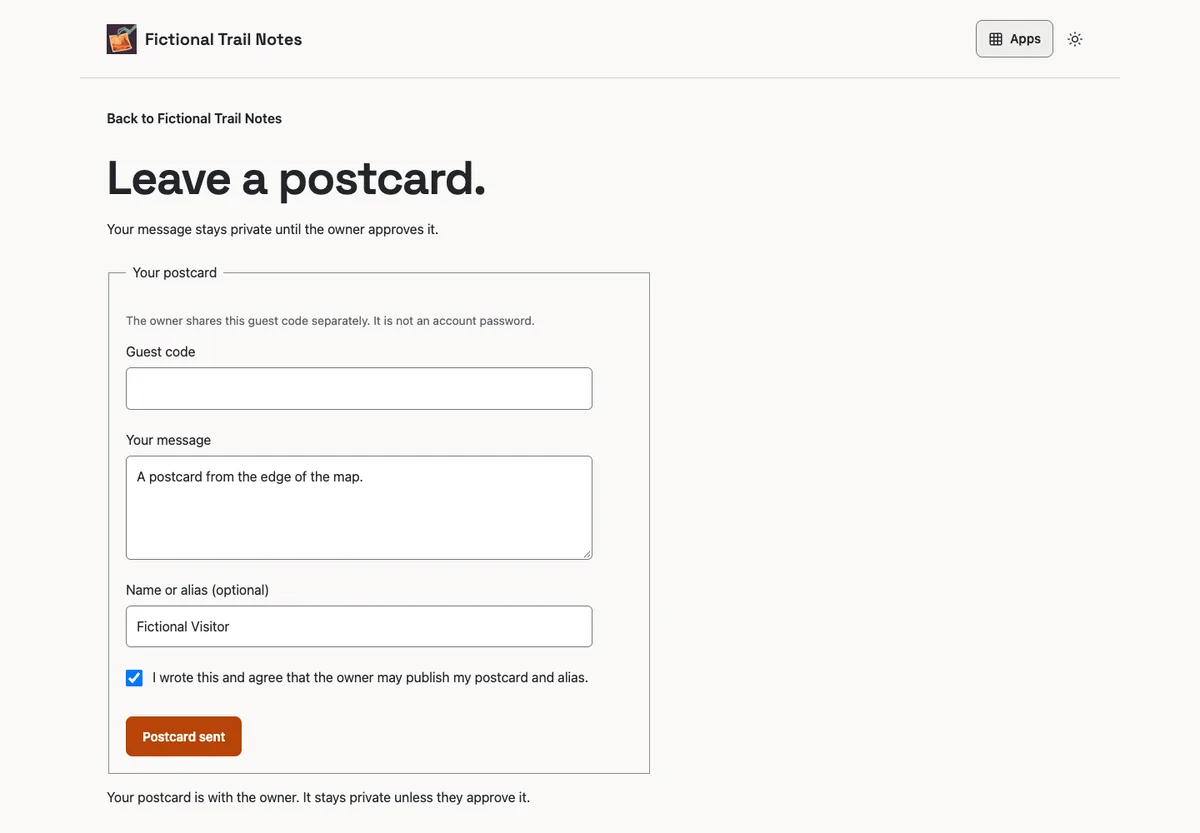
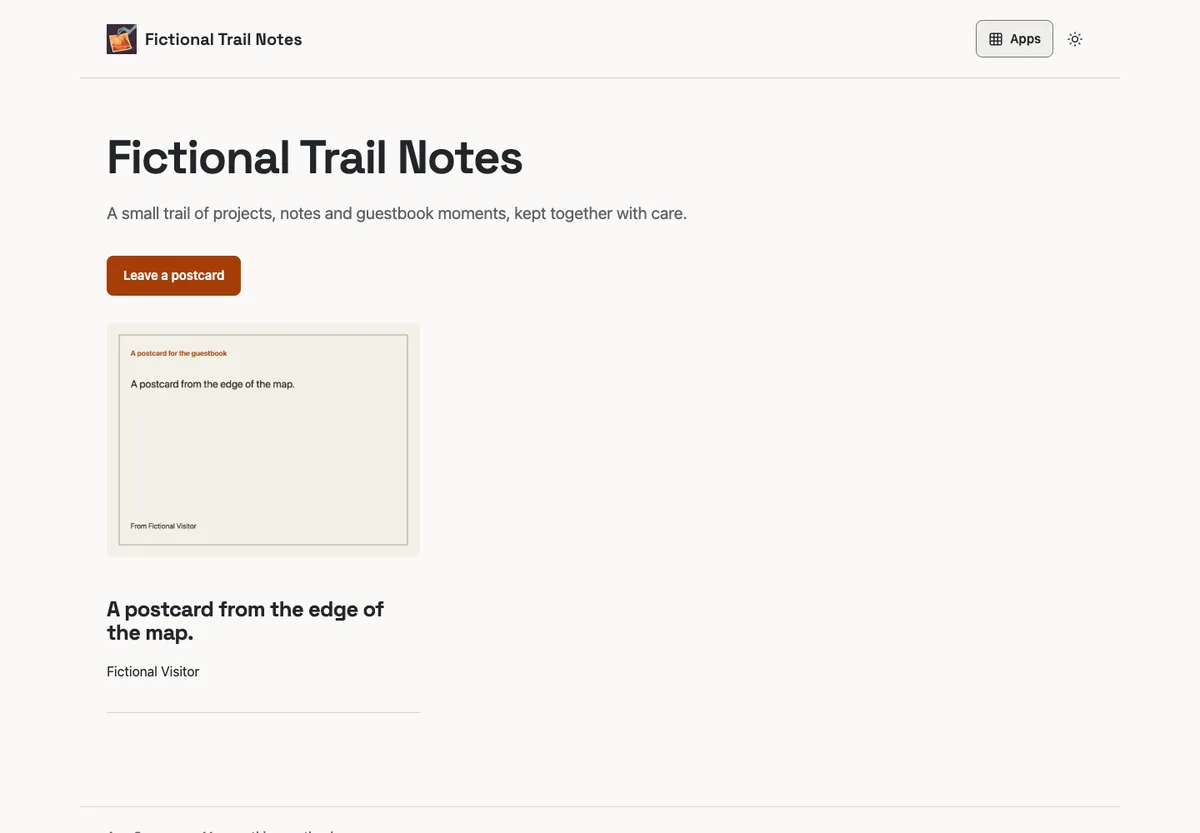
A visitor opens a Linkarooie profile and sees four curated links, a short explanation, and one clear action: Leave a note in the guestbook. The action opens Here / there's real postcard form. The note becomes a pending, private record. The owner approves it in Guestbook. Only then does Linkarooie offer it as a separate featuring choice. Hiding it at the source removes the card and media on the next request.
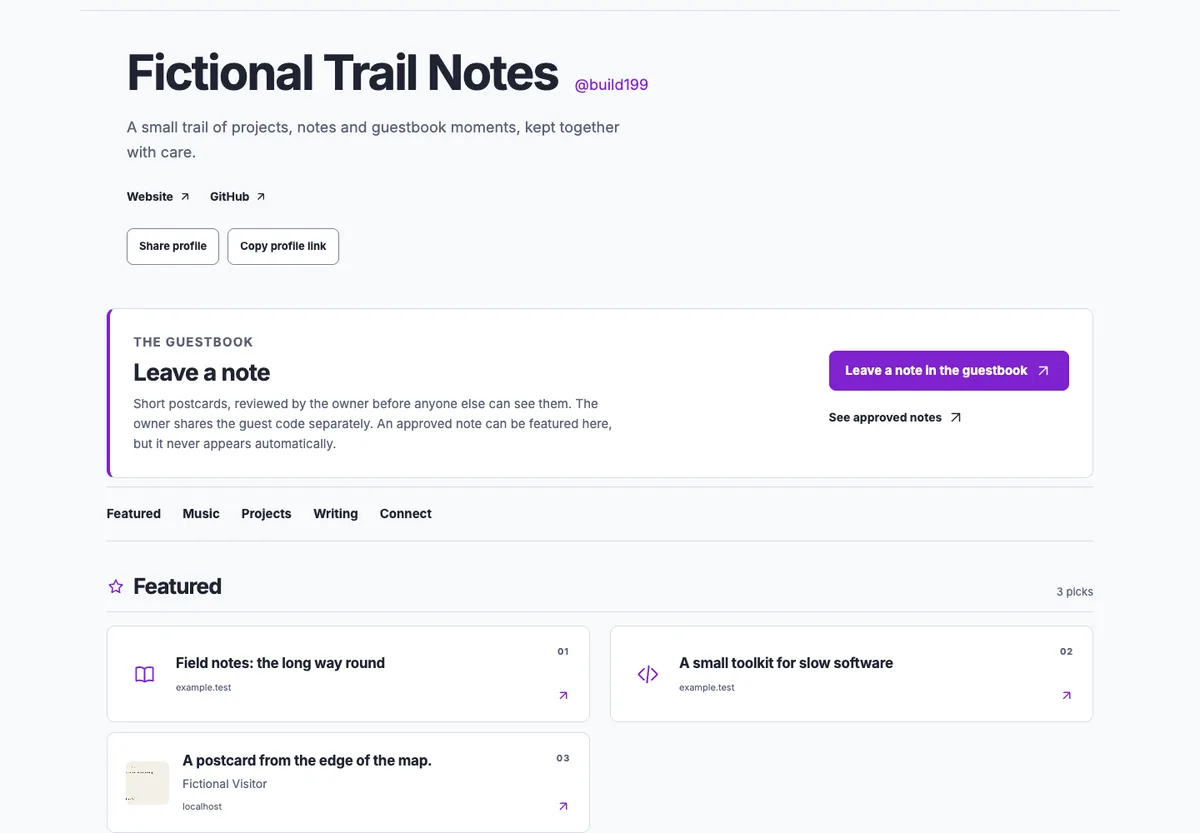
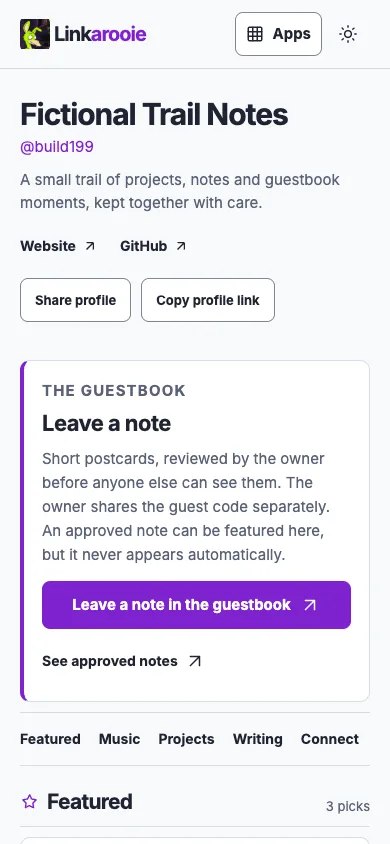
These are actual browser captures from two locally running Workers, not mockups. The note, name, links and profile are fictional. The local addresses are visible because the run is local; no hosted deployment is implied.
What App Composer is, and what it is not
App Composer is a place to compose independent apps into one public result. Each app keeps its own source repository, records, media, owner API and release. Composer keeps the workspace, the saved stack, the publication revision and the reviewed connection between them. It is not a second content store, and it does not make every app share one database.
App Composer
Astro pages for the public product, EmDash for native administration, D1 and R2 for Composer's own workspace and publication records, and a small bridge for declared app actions.
Here / there
An independent Cloudflare Worker. It owns postcard submissions, private review, approval, PNG media, source visibility and revocation. Its D1 and R2 data stay with that app.
Linkarooie
Another independent Worker. It owns the profile, authored links, curation and which approved source items are featured. It asks Guestbook for current eligibility on every render.
The agent
A coding agent works in the selected repositories: it reads the brief, prepares the environment, changes source, runs checks and follows the release path. Account access, spending and consequential permissions stay human decisions.
The development history, briefly and accurately
The first commit is 11 October 2026. The working foundation landed on 13 October: the public site, independent composition, Init, the decision explorer, guarded Access administration and a first readiness handoff. The following days added the readiness core, a verified Hello update, the app library and launcher, the composed collection, workspace roles, private outcomes, the enquiry inbox, the owner experience and the approved orange identity. This article describes a change made on 22 October; it is not a retrospective claim that the whole product appeared in one session.
Where the self-build claim is real: Composer's own Init produced the portable specification used to configure the local Linkarooie instance below. This article is itself an Astro page in the Composer repository, built and released through Composer's own checks and guarded deployment. We are not claiming that Composer autonomously wrote its own source, chose its own architecture or deployed without an agent and an owner.
The brief was a question, not a feature list
Why would I want Guestbook entries on Linkarooie? Isn't Guestbook how other people write or comment on my Linkarooie?
The relationship was real but hard to discover. Linkarooie could feature an approved Guestbook moment, yet the profile did not explain where notes come from, who reviews them, or why a featured card is not the same thing as a submission. The easiest wrong answer was a comment box inside Linkarooie. That would duplicate Guestbook's intake, moderation, retention and revocation, and it would create a second place where private visitor text could leak.
The accepted brief separated three states in plain language:
Sent for review
The visitor writes a short postcard. It is pending and private. Nothing appears on the profile.
Approved in Guestbook
The owner reviews it at the source. Approval makes it public in the Guestbook collection.
Featured in Linkarooie
The owner makes a separate curation choice. The card resolves the live source and disappears when that source is hidden.
The action must be honest. If the configured Guestbook is closed, paused, full or unreachable, the profile must not show a send button that leads to a dead form. It also must not expose the guest code, owner credentials or technical abuse controls on the profile. The full acceptance criteria live in #196.
From the brief to a real Init specification
Init is the part of Composer that turns configuration into a portable handoff. For this walkthrough it produced a version 2 composition spec with the title, introduction, separate Guestbook and Linkarooie settings, four authored links and a preview destination. The spec pinned the reviewed app sources it was generated from. It did not contain a credential, and it did not decide how the contribution contract should work.
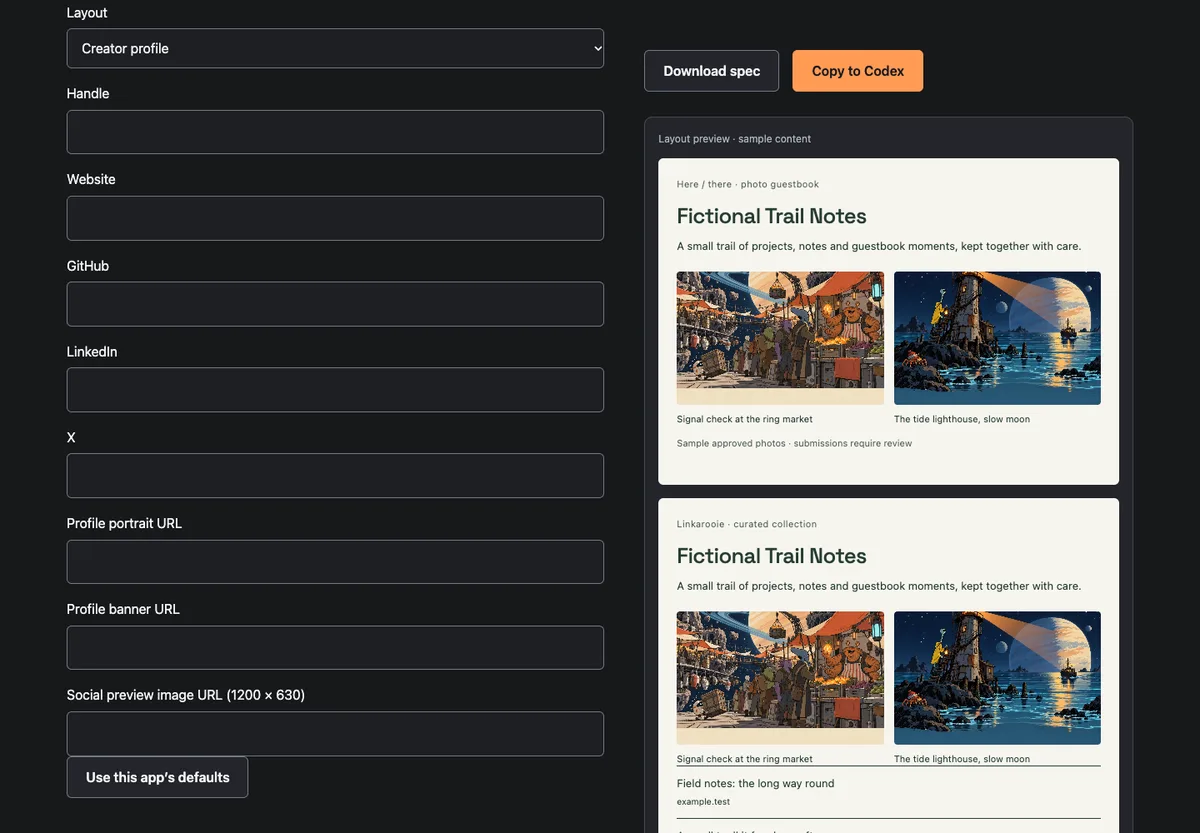
The specification's operative settings
{
  "preset": "composition",
  "appSettings": {
    "guestbook": {
      "title": "Fictional Trail Notes",
      "theme": "daylight",
      "guestAccess": "postcards"
    },
    "showcase": {
      "title": "Fictional Trail Notes",
      "theme": "daylight",
      "layout": "profile"
    }
  },
  "cards": [
    { "title": "Field notes: the long way round", "url": "https://example.test/field-notes" },
    { "title": "A small toolkit for slow software", "url": "https://example.test/slow-software" },
    { "title": "Weekend radio", "url": "https://example.test/weekend-radio" },
    { "title": "Reading list, autumn", "url": "https://example.test/reading" }
  ],
  "deployment": { "mode": "preview" }
}
The handoff fixed the starting shape. The agent still had to implement the missing cross-app contract, the public state handling, the owner control and the tests. That is the useful division: Init records the decisions a person can review; the agent owns the implementation and the evidence.
The change: ask the source, do not guess
Guestbook already had a public contribution page and an owner review flow. What it lacked was a small, versioned answer to a different question: does this exact Guestbook currently accept guest postcards? The new public endpoint is deliberately boring:
GET /r/:resource/api/invitation

{
  "contract": 1,
  "provider": "guestbook",
  "resource": "…",
  "invitation": {
    "version": 1,
    "kind": "postcard",
    "state": "open | paused | closed | full",
    "accepts": true,
    "configuration": 3,
    "contribute": "https://…/c/3/contribute",
    "collection": "https://…/c/3/",
    "limits": { "message": 160, "alias": 60,
                "width": 1200, "height": 900, "bytes": 100000 }
  }
}
The state follows the resource's current active configuration, not the historical activation path. Paused wins over open. A closed postcard setting is closed. A pending queue at 16 or a non-deleted item count at 200 is full. The same function now controls the Guestbook's own /contribute page, so the source no longer shows a form that would immediately fail. The response contains no guest code, owner token, media or submission text.
Composer's promotion boundary validates the exact manifest descriptor, so a future release cannot quietly add a state or widen the limits:
"guestInvitation": {
  "version": 1,
  "kind": "postcard",
  "route": "/r/:resource/api/invitation",
  "states": ["open", "paused", "closed", "full"],
  "default": "closed",
  "limits": { "message": 160, "alias": 60,
              "width": 1200, "height": 900, "bytes": 100000 }
}
Linkarooie stores one exact { kind, version, resource, configuration } reference. It fetches the invitation through its configured service binding, checks the provider, resource, field set, limits and exact contribution paths, and treats a redirect, foreign origin or partial response as unavailable. The public panel then renders one of five states. Only open produces a send action.
What the owner controls
The native Collect from a saved visitor book control can link, replace or stop the invitation for an exact saved stack instance. Enabling is refused for a hidden or pending book. The same owner boundary exists in the standalone Linkarooie studio. Guestbook still owns approval; Linkarooie still owns the separate featuring choice.
The implementation touched both independent repositories and Composer's bridge:
- Guestbook 019ce0d: public invitation state, shared contribution-page state, manifest descriptor and tests.
- Linkarooie 20ef9a5: exact source reader, public panel, owner endpoint and studio controls, collection export.
- Composer's collection bridge: native link/replace/stop actions and a versioned reply that separates the selected book from the linked source.
Local checks: 103 Guestbook tests, 100 Linkarooie tests, and the full Composer suite. The article adds a publication check for its own assets and links. The tests include malformed provider responses, a foreign origin, a changed limit, a hidden book, a configuration advance, mounted and standalone links, and the full open, closed, paused and full public states.
Run the same thing locally
The demonstration uses the actual app source and Wrangler's local Workers runtime. It does not need a Cloudflare account, an Access session, a paid service or a hosted deployment. It needs Node 22, the declared pnpm version, the pinned dependencies, a native Wrangler install, and a host browser for the captures.
Docker was not used for this run. The supported local path is Wrangler's workerd with local D1 and R2 emulation; a container would still download a platform-specific runtime and would still need a host browser for screenshots. That boundary is stated rather than hidden. Docker support for this walkthrough remains unexercised work.
- Start two disposable Workers.
labs/building/start-local.shcopies the two app repositories to one owned temporary root, prepares local migrations, writes fictional local configuration and starts Guestbook on 8788 and Linkarooie on 8787. It leaves the working repositories and their owner state untouched. - Apply the Init spec.
seed-local.mjscreates a fresh Guestbook resource, stages and activates the Guestbook settings, applies the Linkarooie profile and links, and links the exact source for contributions. It talks only to the asserted localhost Workers. - Exercise the real journey.
capture-journey.mjsopens the profile, submits a fictional postcard through the real form, records the pending receipt, approves it through the app-owned moderation contract, features it, hides it at source, closes and reopens the Guestbook, and captures phone and desktop states. Every assertion is written tooutput/build-199/captures/report.json. - Stop and remove the owned run.
stop-local.shstops only the two processes it started and removes the temporary root. The working repositories, their.wranglerstate, owner records and browser sessions are not touched.
Commands used in this run
# From the Composer repository
labs/building/start-local.sh
RESOURCE_ID=build199-trail-8   INIT_SPEC=public/downloads/building-199-init-spec.json   node labs/building/seed-local.mjs
RESOURCE_ID=build199-trail-8   PLAYWRIGHT_MODULE=/path/to/playwright/index.mjs   node labs/building/capture-journey.mjs
labs/building/stop-local.sh
The exact local addresses, source revisions, screenshot hashes and capture note are in the capture provenance. The run is not a deployment: it proves the app contracts, states and browser behaviour under local emulation, not a Cloudflare release or a live owner configuration.
The journey, in the order a person sees it
1. The visitor writes a note
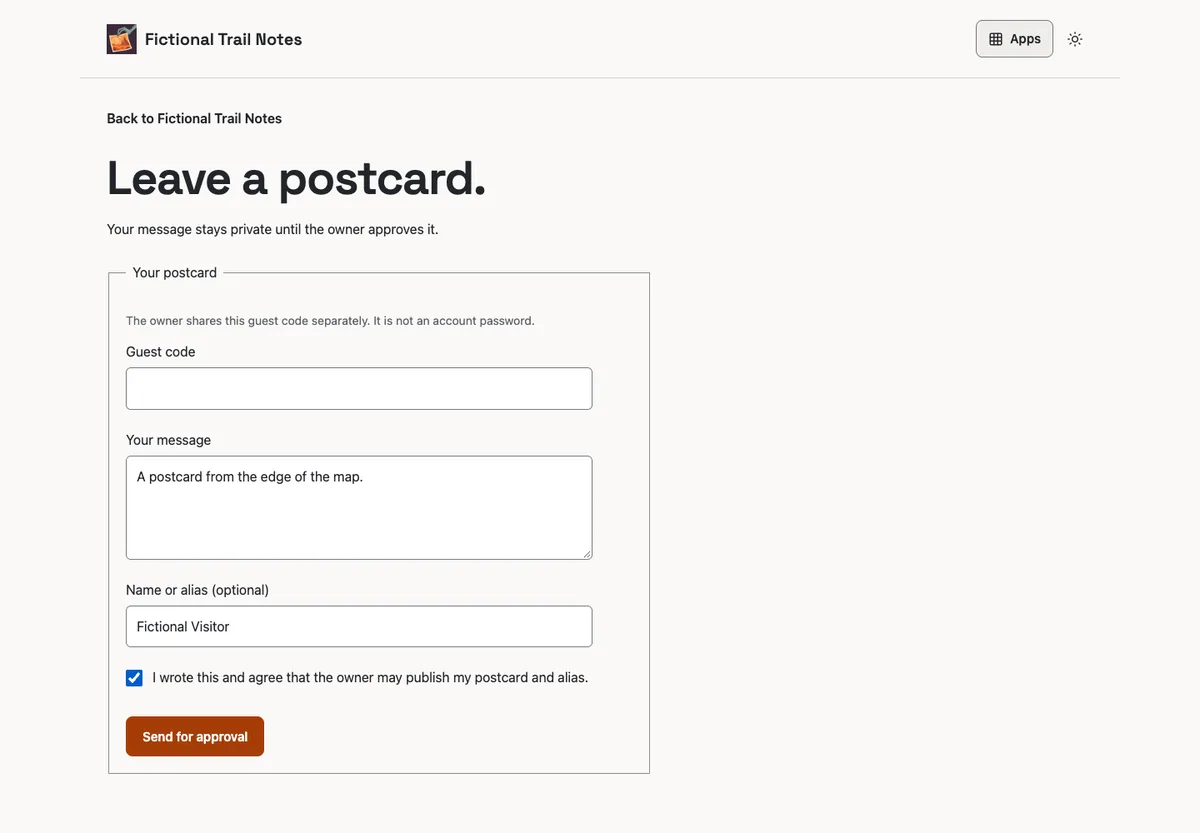
2. The owner reviews at the source
3. Revocation and closed states are visible, not implied
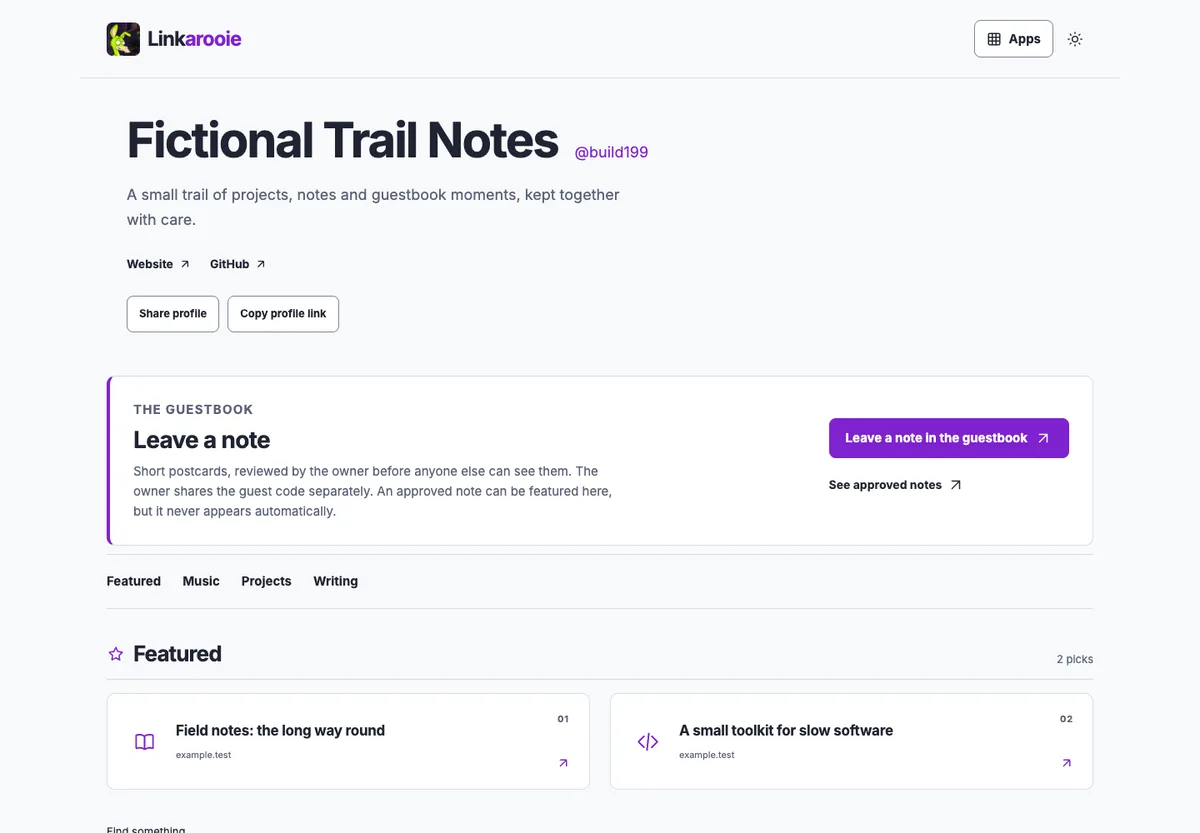
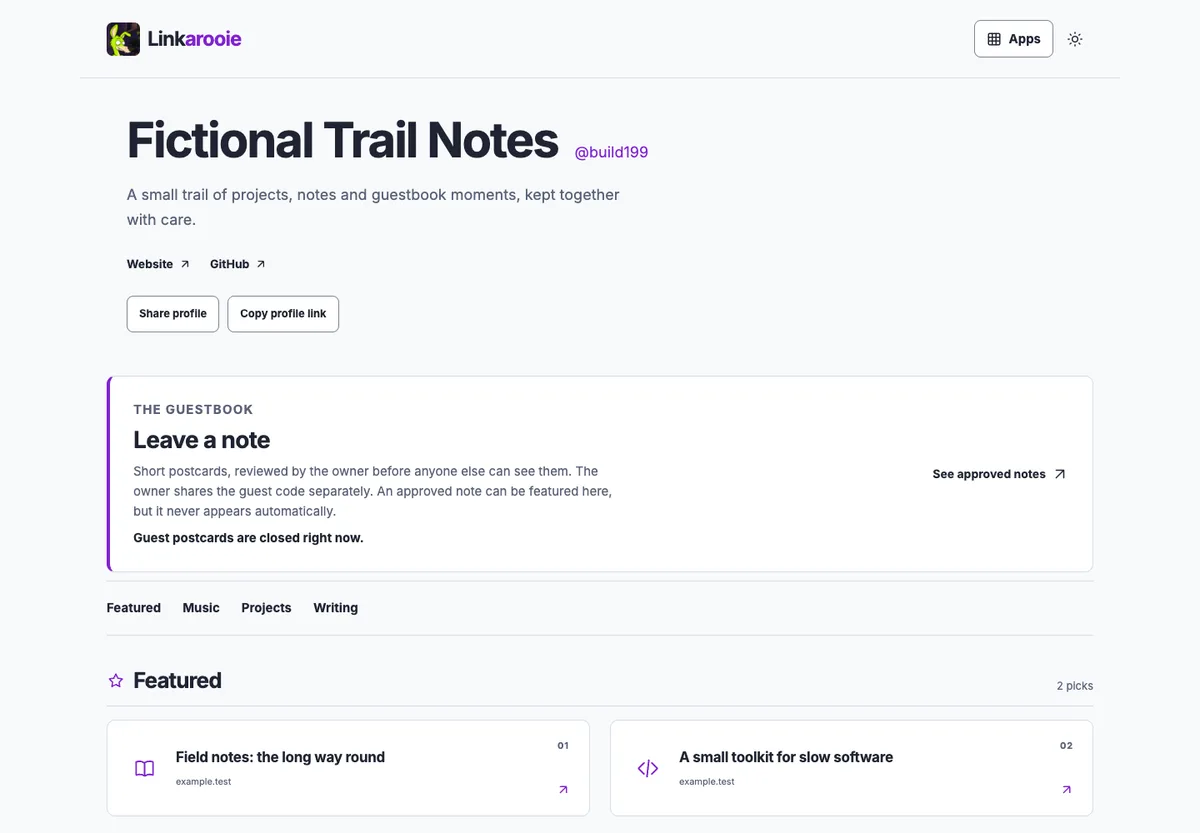
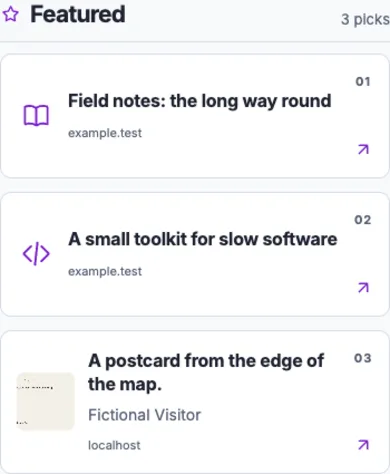
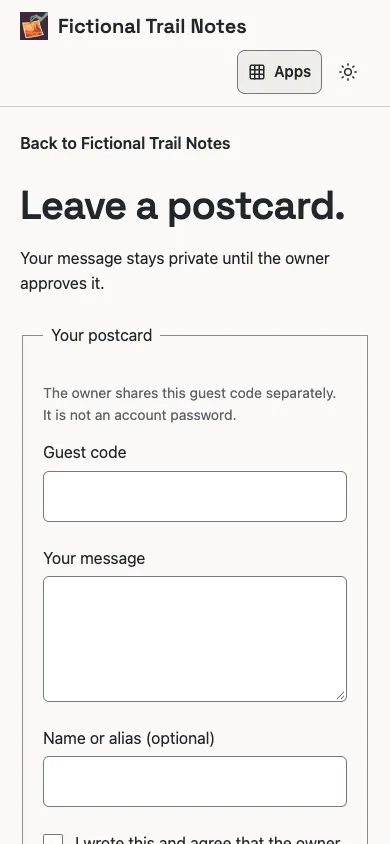
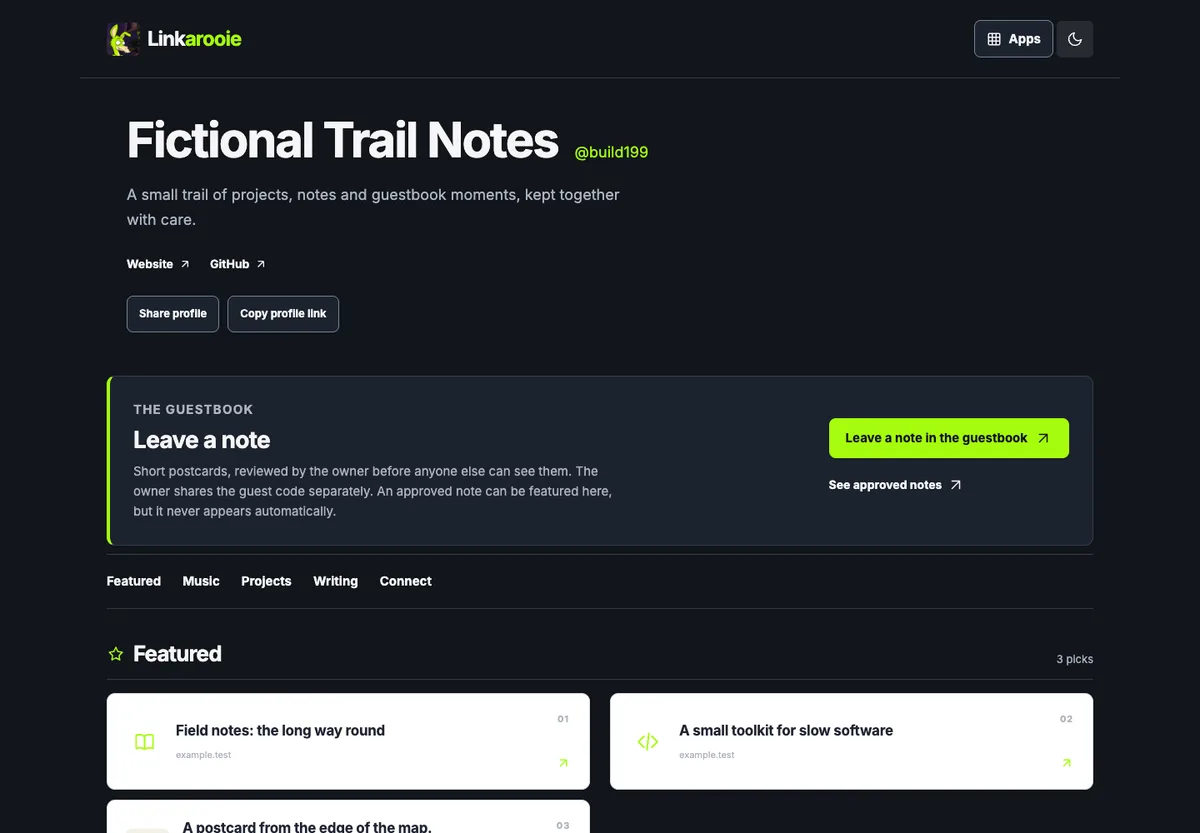
The postcard image is generated by the visitor's browser from the message and alias. It is not a photograph, and the CTA does not add a photo-upload path to Linkarooie. The screenshot set is labelled by state; a pending note never appears in the featured section.
Why this is composition, not a merged app


Text version of the contribution flow
- A visitor opens the profile. The Guestbook form is offered only while the source says it is open.
- The form creates a pending private record and media in Guestbook.
- The owner approves, rejects or hides it in Guestbook.
- An approved item is public in Guestbook. Linkarooie may feature it only after a separate owner choice.
- Hiding or revoking it at source removes the card and media on the next request.
| Thing | Owner | What the other app may do |
|---|---|---|
| Postcard text and PNG | Guestbook | Linkarooie receives only a current public item projection when eligible. |
| Review, approval, hide, delete | Guestbook | Linkarooie cannot moderate, reply or restore it. |
| Which item is featured | Linkarooie | Guestbook does not publish a card on Linkarooie. |
| Workspace, stack, publication | App Composer | The apps keep their own records and APIs. |
| Invitation state | Guestbook, current active configuration | Linkarooie reads it and renders the honest public state. |
The contract is a request, not a copy. Linkarooie does not receive a moderation token, a guest code, the pending text or a durable copy of the media. It stores the exact source reference and a card. Every public render resolves the source again.
The shape of the system


Text version of the architecture
- The visitor uses public HTTPS pages; the invited owner uses the existing Access and EmDash role boundary.
- The authorised agent changes reviewed source in the independent repositories. Prompt text is data, not authority.
- Composer pins exact app source and connects to the apps through declared service bindings.
- Guestbook keeps its own D1, R2 media, review and revocation. Linkarooie keeps its own D1, links and curation.
- Live identity is a separate check of the deployed Worker version, custom hostname and observed behaviour.
The workflow that produced it


Text version of the workflow
- Start with the outcome and limits. Use Get Ready only when the environment or target is not already verified.
- Turn the brief into an Init specification. The spec is portable data; it grants no execution authority.
- The agent implements the change in the selected source, with tests and a local run.
- Review the rendered phone, desktop, keyboard and failure states. Send findings back to implementation.
- Release through the guarded path, then verify the exact source, hostname and behaviour. The next change starts a new loop.
What this proves, and what it does not
Proved in this run
- The exact-source invitation contract works against two real local Workers and real SQLite-backed D1 behaviour.
- A pending note is private; approval makes it public; featuring is a separate explicit card; hiding returns 404 for the item API and media and removes the card.
- Closed, paused, full and unavailable states do not render a send action, and mounted/standalone links preserve their destinations.
- The owner can link, replace or stop the invitation from the native collection control; a hidden or pending book is refused.
- The article, screenshots and diagrams are built from the same repository and capture run that are linked here.
Not proved
- No hosted deployment of this contribution feature is claimed from the local run, and the owner's live profile configuration was not changed.
- No photo upload from the Linkarooie CTA, no public comment thread, no replies, notifications, guest accounts or general multi-tenant signup.
- No screen-reader, physical touch-device, external social unfurl or full migration acceptance.
- Docker was not exercised for this walkthrough; the supported local path is Wrangler's runtime.
- Restoring code does not restore hidden or deleted data. Configuration rollback and content/media recovery remain separate.
The guest code is an existing narrow admission control, shared by the owner. It is not an account, and it never grants the owner studio. If the owner has not shared it, the form explains that before asking for a message.
Try it, or take the source
The starting point is Init for a portable composition, Get Ready when the environment is not yet proven, and Your app, your admin for the owner surface. The public fictional stacks remain available at Fictional Trail Notes and Fictional Launch Board.
Narration and shot list
A short version for a recorded walkthrough. The article is the complete reference; the list is not a separate claim.
- Open on the finished profile. “This is a real profile, four links, one guestbook invitation and one approved note.” Show desktop then phone.
- Explain the two jobs. “Guestbook owns the note and the review. Linkarooie owns the profile and the choice to feature it.”
- Show the brief and the Init spec. “The starting composition is portable data. It does not grant deployment authority.”
- Show the change. “The source now answers one question: does this exact Guestbook accept a postcard right now?”
- Submit the note. Show the real form, the pending receipt and the private state.
- Approve and feature. Show the Guestbook page, then the separate Linkarooie featuring step and card.
- Hide at source. Refresh the profile. “The card and media are gone; the source still owns the record.”
- Close the Guestbook. Refresh. “No button, no dead form. The profile explains the state.” End on the source links and the local run procedure.