
App Composer for app operators.
Choose a job
Run the app after launch.
Check public activity, review owner-only work and keep the release evidence with the app. Start from an existing invitation and the current owner workspace.
What works now, and what needs your setup
The owner workspace needs its existing invitation and access session; this page grants nothing. Public analytics are aggregate and may be incomplete. No static example can guarantee incident remediation or a customer deployment.
Working as an agent? Choose a versioned role pack with inputs, evidence, stop rules and a runnable brief.
Device support not checked yet
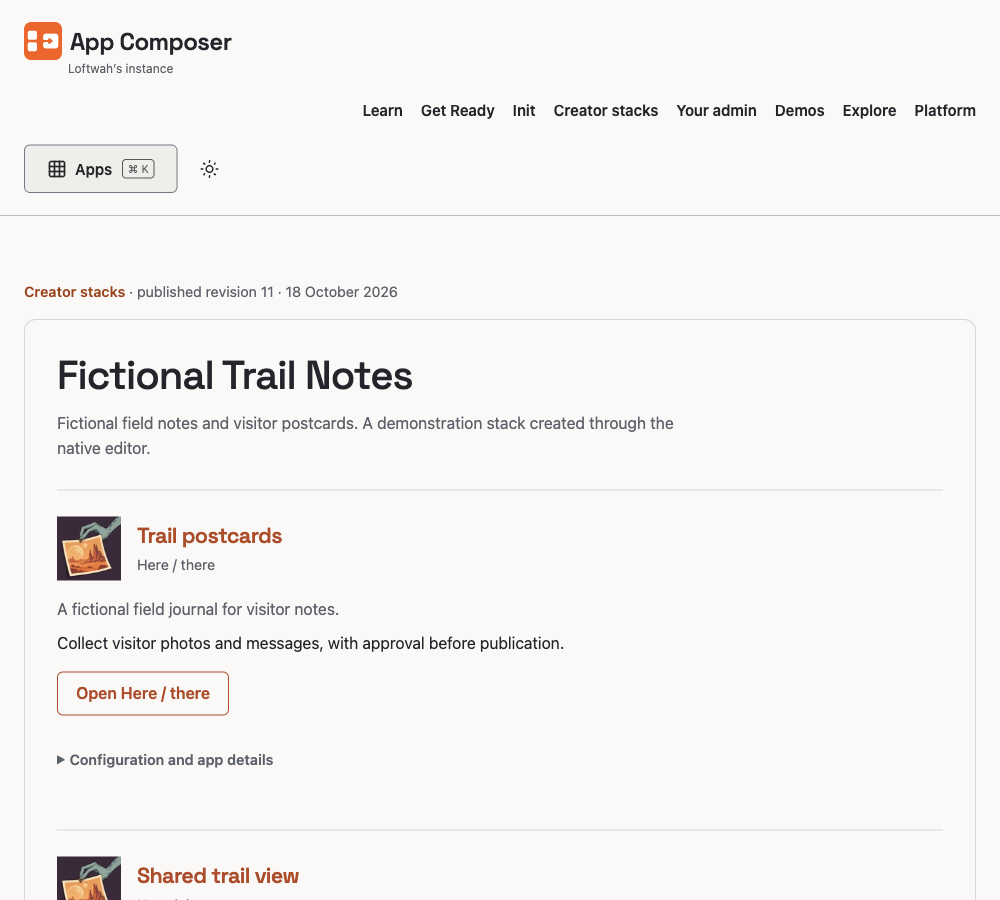
The actual published stack with its saved app instances and owner actions. The private enquiry Inbox behind it is separately protected.
Actual capture · 2026-10-22 · composer.loftwah.comFrom this example to your own project
Read current public activity
Use the real app record and daily evidence; a missing record stays unknown.
Review owner-only work
Open the protected workspace with the existing invitation and permissions.
Check the released source
Read the current release identity and evidence index before changing anything.
Start with the job that fits. Choose another job, browse all apps or return to App Composer.